The three routes into an Alexa house
Route one: Wi-Fi and the maker’s cloud. The plug, the camera and the lock on this list all take this route. The device joins your Wi-Fi, talks to its own maker, and an Alexa skill links the two accounts. It works with any Echo, including the cheapest. The cost is that two clouds now have to be up for your voice command to land.
Route two: Matter. Newer devices speak Matter, and any Echo acting as a Matter controller can commission them — including the Echo Dot. This is the route that keeps a device usable if you ever leave Alexa, which is why we favor Matter plugs and bulbs across the whole site. Our Matter explainer covers what it fixes; the best Matter devices is the shopping list.
Route three: Zigbee or Thread. This is the one that depends entirely on which Echo is on your shelf. Amazon publishes Zigbee, Thread and Matter radios in the Echo Hub; the Echo Dot publishes Wi-Fi, Bluetooth and Matter controller duty, with no Zigbee. If the device you want is a $12 Zigbee door sensor, the Dot cannot hear it and no update will change that. Our Zigbee vs Z-Wave vs Thread guide explains why those radios still exist alongside Wi-Fi, and the best hubs under $200 is the page if the radios are what you are shopping for.
Side by side, using only what each maker publishes
Published specifications only, read from each maker's own pages and listings. 'Not published' means the maker does not state it. Prices are live from the retailer and dated on each button.| Spec | Echo Dot 5th Gen | Echo Hub | Kasa EP25 plug | Tapo C120 camera | Amazon Smart Thermostat | August Wi-Fi Lock |
|---|
| Route into Alexa | Is the controller | Is the hub | Wi-Fi + Kasa skill | Wi-Fi + Tapo skill | Wi-Fi, Amazon's own | Wi-Fi + Bluetooth |
|---|
| Zigbee | No | Yes | No | No | No | No |
|---|
| Thread | Not published | Yes | No | No | No | No |
|---|
| Matter | Yes, as a controller | Yes | No | No | Not published | No |
|---|
| Also works with Google Home | No | No | Yes | Yes | No | Yes |
|---|
| Also works with Apple Home | No | No | Yes | No | No | Yes |
|---|
| Monthly fee for core function | None | None | None | None | None | None |
|---|
| Local storage | Not applicable | Not applicable | Not applicable | microSD to 512GB | Not applicable | Not applicable |
|---|
| Power | Wired | Wired (adapter or PoE) | Wall outlet | Wired | 24V HVAC, C wire required | AA batteries |
|---|
| Check price | $39.99 · View on Amazon$79.9950% off Price as of November 22, 2026. #ad How we’re funded | $74.99 · View on Amazon$179.9958% off Price as of November 22, 2026. #ad How we’re funded | $28.49 · View on Amazon$44.9937% off Price as of November 22, 2026. #ad How we’re funded | $29.99 · View on Amazon$56.9947% off Price as of November 22, 2026. #ad How we’re funded | $56.99 · View on Amazon$79.9929% off Price as of November 22, 2026. #ad How we’re funded | |
|---|
Two rows carry the page. The Zigbee row is the one that decides which Echo you need, and the monthly fee row is the reason these six picks are here and some more famous Alexa devices are not: none of them charges anything to do the job you bought it for.
Why the Echo Dot is the one to buy first
Because the cheapest sensible way into a smart home is a good small speaker that also happens to be a Matter controller. Pair a Matter plug or bulb to it and you have voice control, app control and schedules for the price of a takeaway. For a very large number of households, this plus one four-pack of plugs genuinely is the whole smart home, and everything else on this page is optional.
The honest cons. No Zigbee, which is the single limitation that matters and the reason the Echo Hub is directly below it. Alexa ecosystem lock-in by design. Automations are evaluated in Alexa’s cloud rather than on the device, so an internet outage takes your routines with it. And it has an always-listening microphone, which does not suit every household — if that is your objection, our privacy-first hub comparison is the page to read, and the Echo Dot review is the long version. Amazon’s newer Echo Dot Max is a pricier, better-sounding speaker; the 5th Gen remains the cheap way in.
Why the Echo Hub is the upgrade that changes the shopping list
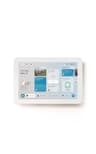
It is a wall-mounted dashboard with real radios behind it: Amazon publishes Zigbee, Thread and Matter built in, which makes it a genuine hub rather than a screen with a speaker. The practical effect is that the cheap sensor shelf opens up — door contacts, motion sensors, buttons — and the rest of the household gets a panel in the hall they can press instead of an app they have to learn.
The honest cons. It is Alexa-centric and much less useful outside that ecosystem, which is a real cost if anyone in the house carries an iPhone and wants the Home app. It wants wired power and proper mounting to look like the product in the photographs. There is no Z-Wave. And it is frank overkill if your smart home is four devices. The Echo Hub review has the rest.
Why the Kasa EP25 is the plug to start with
A four-pack of these is the single best first upgrade in a smart home, Alexa or otherwise: it makes lamps, fans and appliances you already own controllable by voice and schedule. It takes the Wi-Fi route, so it works with any Echo including the cheapest, with no hub and no Matter commissioning to understand. TP-Link publishes Alexa, Google Home and Apple Home for it, so it is the pick that does not trap you if the household changes assistant later. No subscription.
The honest cons. It is 2.4GHz Wi-Fi, so four plugs are four more devices on the crowded band. It is not a Matter device, so it depends on TP-Link’s cloud and skill rather than on a standard — if that matters to you, the Tapo P110M four-pack is the Matter alternative with energy monitoring, and it is ranked in the best smart plugs.
Why the Tapo C120 is the camera for an Alexa house
Because it is the camera on this site that does the most for the least and never asks for a plan. TP-Link publishes a 2K+ sensor, an IP66 rating so the same unit works indoors or out, and microSD recording up to 512GB with Tapo Care cloud explicitly optional. It links to Alexa through the Tapo skill, so it works with any Echo.
The honest cons. It is wired, with no battery option, so your sockets decide where it goes. It is 2.4GHz only. Setup needs a TP-Link cloud account even though the recording is local. And there is no Apple Home. There is also a more Alexa-native option worth naming honestly: Blink is Amazon’s own camera brand and its Alexa integration is the deepest here — but Blink publishes local storage only with a separately sold Sync Module 2 plus USB drive, and its own plan is required for the full feature set, which is the opposite of what this site recommends. See cameras that work with Alexa for that comparison, and the best cameras under $100 for the price-capped version.
Why the Amazon Smart Thermostat is here, caveats and all
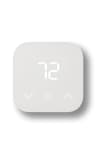
It is the cheapest smart thermostat worth owning, it was built with Honeywell, and in an Alexa house its single-ecosystem design stops being a weakness: Alexa scheduling and Hunches are the features, and you already have the assistant that drives them. It charges nothing monthly.
The honest cons. It requires a C wire and there is no adapter in the box — check your wiring with our C-wire guide before you order, because this is the most common way this purchase fails. It is Alexa-only: no Google, no Apple, no SmartThings, so it is the one pick here that does trap you. Amazon’s own help page confirms the thermostat has no speaker and no microphone, so every voice command runs through a separate Echo or the app rather than through the wall. And there is no remote sensor. If you need the no-C-wire route, the best thermostats under $100 ranks two that publish exactly that.
Why the August Wi-Fi Smart Lock is the front-door pick
It is the lock that does not ask you to change your door. August publishes Wi-Fi and Bluetooth built in, so there is no bridge to buy, the Keypad Touch is in the box for code entry, and auto-unlock, DoorSense and keypad codes are all included with no subscription. Crucially it retrofits onto your existing deadbolt, so your keys keep working — which is why it is also our pick for renters. August publishes Alexa, Google Home and Apple Home.
The honest cons. It runs on AA batteries, so it is a device you feed. The retrofit design means the outside of your door looks unchanged, which some people want and some do not. And a lock is the one category where we would read the review before buying on a price: the full review and smart locks for Alexa both go deeper, and are smart locks safe is the page for the question most people actually have.
What we left off, and why
Ring, as a default. Ring is Amazon’s and its Alexa control is excellent, and it is not on this list because every pick here had to pass the no-fee test. Ring’s recorded history is a plan feature and its own spec pages publish no card slot. If Ring is what you want, the review is honest about both halves, and Ring camera alternatives is the page if the fee is the problem.
Zigbee sensors. They are the best value in the whole smart home and we do not carry one with a verified live listing, so there is nothing here we could rank honestly. If you buy the Echo Hub, that shelf is open to you — just confirm the radio before you order.
A second Alexa display. One wall panel is a feature; two is furniture. We rank the Echo Hub once.
So which one
Starting from nothing: the Echo Dot plus a four-pack of Kasa plugs. That is a working smart home for under a hundred dollars, and it is the honest answer for most households.
You want sensors and a wall panel: the Echo Hub. Zigbee, Thread and Matter in one box, with a screen the rest of the family will use.
You want a camera with no plan: the Tapo C120. 2K+, IP66, a 512GB card slot, and no monthly anything.
Cheapest useful heating control, if you have a C wire: the Amazon Smart Thermostat.
Front door, keys kept: the August Wi-Fi Smart Lock.