How to choose a smart lock
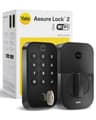
Start with the install, because it rules out half the field before you look at anything else. If you rent, or you simply don’t want to change your keys and your exterior hardware, buy a retrofitlock like the August: it clamps onto the inside of your current deadbolt in a few minutes, and there’s nothing permanent to undo when you move. If you own your home and want a built-in keypad, a cleaner look and a bit more feature depth, a full-replacementdeadbolt like the Yale or the Schlage is the better buy — you’re swapping the whole lock, but you get a more finished result.
Match the connection to your ecosystem
A smart lock is only as convenient as the app and voice assistant it lives in, so let your existing setup decide. If your household runs on iPhones and you want to tap a phone or watch to unlock, the Schlage Encode Plus and the Level Lock+ support Apple Home Key. If you’re on Alexa or Google Home, almost everything here works, and the Yale’s swappable radio moduleis the hedge worth paying for — it starts on Wi-Fi and can move to Matter or Z-Wave later without buying a new lock. If “works with everything” is the goal, Matter is the standard to look for; our Matter guide explains what it fixes, and the compatibility matrix shows which lock pairs with which app.
Think about power and entry before you buy
Almost every lock here runs on replaceable AA batteries, except the Level, which uses a small CR2 cell hidden inside the deadbolt, and the Wyze, which recharges. Keeping Wi-Fi switched on all the time is the main thing that drains a lock, so if battery life matters, a keypad-and-Bluetooth lock you connect to a hub can outlast an always-on Wi-Fi one. Then pick your everyday entry method — a keypad code for guests, a fingerprint for speed, or a tap-to-unlock phone — because that, not the app, is what you’ll use every day. (If the “guests” are paying ones, our smart locks for Airbnb hosts ranking is the version of this page built around reservation codes.) Whatever you choose, none of these locks needs the internet to open from the keypad or a phone at the door, so an outage won’t lock you out; you just lose the remote features until it’s back. If the household runs on Echo speakers, check which of these locks reach Amazon without an extra accessory in our best Alexa smart locks ranking. The Google-speaking households have their own version, built on what each maker documents about Google rather than on an ecosystem badge: best smart locks for Google Home. And before you budget for any of this, it is worth knowing that none of these locks charges monthly for codes, history, remote access or voice — do smart locks require a subscription? sets out what the paid add-ons in this category actually are. If the thing holding you back is the fitting rather than the price, are smart locks easy to install? sorts these locks into the three genuinely different jobs they ask of your door.