The spec that decides this: the IoT class
Home Assistant publishes, on every integration page, a label called the IoT class. It describes where the work happens. For locks there are two that matter.
Local Push means Home Assistant talks to the device directly on your own network and the device pushes changes back. No internet, no account, nothing to go down. The Yale Access Bluetooth integration is Local Push, and it is the only local path to any lock in our registry.
Cloud Pushmeans Home Assistant holds a connection to the maker’s service, which pushes changes as they happen. It is responsive — far better than polling — but the maker’s servers are in the path, which means an outage at their end is an outage at yours. Both the August and Yale integrations are Cloud Push, and both authenticate with the same credentials you use in the phone app.
That is the whole ranking in one paragraph: a lock with a local path beats a lock with only a cloud path, and a lock with no documented integration at all comes last. It is also why this page looks nothing like a normal “best smart lock” list — build quality and keypads matter, but they do not change whether Home Assistant can see the thing.
Why the August wins, and the catch you should know first
Two documented facts put the August first. Home Assistant’s August integration page carries a known-working table, and the August Wi-Fi Smart Lock (Gen 4)is listed there as requiring no Connect Bridge or Doorbell — which is notable because the page states plainly that “Most devices will need either August Connect Bridge or Doorbell to connect to Home Assistant”. Separately, the local Yale Access Bluetooth integration lists ASL-05 among its supported August locks, and ASL-05 is the model designation on the Yale-branded fourth-generation lock that the listing we link sells with the Keypad Touch.
The catch is the offline key. Home Assistant documents that the local Bluetooth integration needs one in order to operate the lock, and that there are two ways to get it: the Yale or August cloud integration can provision it automatically when the account you configure actually holds the key, or you extract it by hand from the phone app’s data. Home Assistant also notes that Auto-Unlock must have been enabled and used at least once for the key to exist at all. In practice that means the comfortable route is to set up the cloud integration first and let it hand the key to the local one.
One more note that will save you an evening: Home Assistant warns that lock operation needs a low-latency encrypted connection and recommends a high-performance Bluetooth adapter or an ESPHome Bluetooth proxy. If your server lives in a cupboard two rooms from the front door, the proxy is not optional — it is the install. Budget for a small ESP32 near the door.
The Yale route, and the bridge question
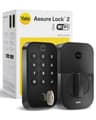
The Yale Assure Lock 2 is the better lock for most front doors in general — it is a full deadbolt replacement with a touchscreen keypad and unlimited shared codes, and its radio is a swappable module. For Home Assistant specifically it has one wrinkle: both integrations that can reach it list it as needing extra hardware. The August integration’s table marks the Yale Assure Lock and the Assure Lock 2 as requiring a Connect Bridge or Doorbell, and the Yale integration’s table says the same for the Assure Lock, Conexis L1, Conexis L2, Doorman L3, Linus and Smart Safe — with only the Linus L2 requiring neither.
Read that against Yale’s own position and it makes sense: Yale publishes that Bluetooth is included on every Assure Lock 2 while the Wi-Fi module is the upgrade that enables remote access and the additional integrations. The Wi-Fi module version is, in effect, the bridge. Local control is still available by the other route: the YRD216, YRL216, YRD226, YRL226, YRD256, YRD420 and YRD450 are all on the Yale Access Bluetooth supported list, so a Yale on the local integration is a documented path — it just needs the same offline key, and the same Bluetooth coverage at the door.
The Schlage, and what we could not verify
The Schlage Encode Plus is the most heavily built lock we cover: Schlage publishes an ANSI/BHMA A156.40 Grade AAA rating, up to 100 scheduled access codes, a built-in alarm and Wi-Fi with no additional accessories. We looked for a Home Assistant integration for it and did not find one, and Schlage’s own works-with page does not mention Matter anywhere — it lists Alexa, Google, Apple Home and Home Key, and the Ring Video Doorbell integration through the Key by Amazon app.
So the honest statement is this: we could not establish a documented, first-party path from the Encode Plus into Home Assistant. It is on this page because plenty of people buy the Schlage for the hardware and reach it from Apple Home, where it is excellent, and because leaving it off silently would be less useful than saying why it is third. If direct Home Assistant control is a requirement rather than a preference, buy the August.
The three locks compared on what Home Assistant publishes
IoT classes, known-working tables and platform lists are quoted from the Home Assistant project's own integration pages, read on the date at the top of this page. 'None published' means we found no first-party documentation — not that nothing exists. | August Wi-Fi Smart Lock | Yale Assure Lock 2 | Schlage Encode Plus |
|---|
| Cloud integration | August — Cloud Push | August / Yale — Cloud Push | None published |
|---|
| Local integration | Yale Access Bluetooth — Local Push (ASL-05 listed) | Yale Access Bluetooth — Local Push (YRD/YRL listed) | None published |
|---|
| Bridge or doorbell required | No, per the known-working table | Yes, per both tables | Not applicable |
|---|
| Offline key needed for local control | Yes | Yes | Not applicable |
|---|
| Platforms exposed | Lock, sensor, binary sensor, button, event | Lock, sensor, camera, doorbell, button, event | Not applicable |
|---|
| Install type | Retrofits over your deadbolt | Replaces the deadbolt | Replaces the deadbolt |
|---|
| Keypad in the box | Yes, Keypad Touch included | Yes, touchscreen | Yes |
|---|
| Also reachable from | Alexa, Google Home, Apple Home | Alexa, Google Home | Alexa, Google Home, Apple Home + Home Key |
|---|
| Monthly fee | None | None | None |
|---|
The first three rows are the ranking. Everything below them is why you might overrule it: if you want a keypad deadbolt that replaces your existing hardware and you already own a Connect Bridge, the Yale is the nicer lock to live with. If you want the strongest physical lock and Apple Home is already your front end, the Schlage is the better buy and Home Assistant is not the deciding factor.
What about Z-Wave, Zigbee and Matter locks?
They are the obvious answer and we deliberately do not fake one. A Z-Wave or Zigbee deadbolt paired to a stick on your Home Assistant box is about as local as a lock gets, and Home Assistant’s own Bluetooth path is the next best thing. But our registry carries the Wi-Fi variants of these locks, not the Z-Wave ones, and we do not recommend a product we have not verified as a live, purchasable listing. The Yale is the lock to watch here, because its radio is a module: Yale publishes Z-Wave and Matter modules for the Assure Lock 2, so the same lock can change protocol without being replaced.
If the whole point of your setup is that nothing leaves the house, the hub matters more than the lock. Our ranking of hubs for privacy covers the three boxes that run automations locally, and what still works without internet is the broader version of this question. For the camera half of the same setup, our Home Assistant camera ranking uses exactly this method.