What an Airbnb lock actually needs to do
The single feature that separates a host’s lock from a homeowner’s is the reservation-generated code. All three brands here list Airbnb support, and the two that document the mechanism in detail, Yale and August, describe it the same way: when a guest books, a unique code is generated and delivered to them through Airbnb, and it works only for the length of the stay. Yale’s wording is that codes are “set to expire at checkout via the Airbnb app”; August’s is that “door codes stay active only during guest’s stay duration.” Schlage’s product page lists “Works with the Airbnb app” among the Encode Plus’s integrations.
That one feature removes the two ways a host lock goes wrong: the forgotten code that still opens the door a month later, and the frantic manual code entry when a guest arrives early. Both Yale and August note that the integration is available for locks operating in the U.S. and Canada, and Yale adds that only the primary host can pair the accounts. If you host outside those two countries, the locks still work as remote-managed keypad locks; you just schedule codes yourself.
1. Built-in Wi-Fi, or a bridge?
Remote code management needs the lock on the internet, and there are two ways to get it there. The Yale Assure Lock 2 with the Wi-Fi module and the Schlage Encode Plus have Wi-Fi built into the lock — Schlage’s phrasing is “no additional accessories needed.” The August Wi-Fi Smart Lock also builds it in. That matters for a rental because a bridge is one more plug-in box for a guest to unplug while hunting for an outlet.
The catch is battery life. Wi-Fi is the hungriest radio a lock can carry, which is why Yale sells hosting bundles “paired with a Wi-Fi Connect bridge” and describes them as offering “extended battery life for smarter hosting” — the bridge takes over the Wi-Fi job so the lock itself only speaks low-power Bluetooth. August’s hosting bundles include its Connect bridge for the same stated reason. Read that as a spec, not a marketing flourish: a lock that phones home over Wi-Fi from inside the door will eat batteries faster than one that does not, and a rental is exactly where you cannot pop round to swap them.
Schlage publishes the one hard figure: four AA batteries and “up to six months of battery life with typical use,” with a low-battery warning on the touchscreen and in the app. Yale lists four AA batteries for the Assure Lock 2 without a duration on the product page; August lists AA batteries. For a rental, plan on a battery change per season and put it on the cleaner’s checklist, whatever the lock.
2. Codes: how many, and how they are scheduled
Schlage publishes the clearest number here: the Encode Plus lets you “schedule up to 100 access codes,” each permanent, recurring or temporary. One hundred is more than any rental needs at once, but the scheduling types are the point — a recurring code for the cleaner on Tuesdays and a temporary one for a plumber both fit without touching the guest codes. Yale’s product page says you can “share unlimited codes with family, friends, and service people” and does not state a maximum. August’s lock has no keypad in the box: codes live on a separate August keypad, which August says is required for the Airbnb integration to work. Budget for it if you go the August route.
3. The door itself: keypad, key, and a guest with a dead phone
A guest should never need an app. Both Yale and August state that guests receive their code through Airbnb and use the keypad; August is explicit that guests “are required to access with a Keypad.” So the keypad is not optional for a rental, and this is where the three locks differ physically.
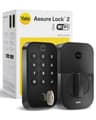
The Yale Assure Lock 2 and Schlage Encode Plus are full deadbolt replacements with the keypad built into the exterior. Yale sells the Assure Lock 2 in keyed and key-free versions; if you want a physical override for the day the batteries die, buy the keyed one. Schlage publishes an ANSI/BHMA A156.40 Grade AAA rating in security, durability and finish and a built-in alarm for door movement and forced entry — the most robust hardware specification on this page, and a reasonable thing to want on a door that strangers cycle through. The August Wi-Fi Smart Lock is a retrofit: it replaces only the interior thumb-turn, keeps your existing exterior deadbolt and keys, and adds the keypad as a separate battery-powered pad stuck beside the door. That is the right answer if your building or lease forbids changing the exterior hardware, and the weakest one if you would rather have a single, solid unit.
4. Auto-lock is a hosting feature, not a convenience
Guests leave doors unlocked. The fix is a lock that locks itself. Yale’s Assure Lock 2 pairs Auto-Lock with DoorSense, a sensor that knows whether the door is actually closed, so it does not throw the bolt into an open frame. August’s lock includes auto-unlock and DoorSense as standard, with no subscription. Schlage’s app lets you check the lock status and lock remotely from anywhere. Whichever you pick, turn auto-lock on before the first guest arrives and set it to a short delay; it is the cheapest insurance in hosting.
The picks compared
Manufacturer-published figures only, read on the date at the top of this page. | Yale Assure Lock 2 (Wi-Fi) | Schlage Encode Plus | August Wi-Fi Smart Lock |
|---|
| Official Airbnb integration | Yes (Wi-Fi module) | Yes — 'Works with the Airbnb app' | Yes, with an August keypad |
|---|
| How it reaches the internet | Built-in Wi-Fi (or Connect bridge in host bundles) | Built-in Wi-Fi | Built-in Wi-Fi |
|---|
| Codes | Unlimited shared codes | Up to 100, scheduled | Via separate keypad |
|---|
| Install type | Full deadbolt replacement | Full deadbolt replacement | Retrofit, keeps existing deadbolt |
|---|
| Keypad | Built in (touchscreen) | Built in | Sold separately |
|---|
| Batteries | 4 x AA (life not published) | 4 x AA, up to 6 months typical | AA |
|---|
| Security grade | ANSI/BHMA Grade 2 | ANSI/BHMA A156.40 Grade AAA | Uses your existing deadbolt |
|---|
| Voice / ecosystem | Alexa, Google; Siri via the Yale app | Alexa, Google, Apple Home with home keys | Alexa, Google, Apple Home |
|---|
| Subscription | None | None | None |
|---|
The Yale is first because it is the only lock here that answers every hosting question in one box: official Airbnb integration, a keypad on the door, built-in Wi-Fi for remote management, Auto-Lock with DoorSense, and a keyed version for the day the batteries die. Yale also sells the swappable-module design that lets you move the same lock to a different radio later, which our Assure Lock 2 review covers. The Schlage is the pick if the property is high-traffic or you simply want the strongest published hardware rating and the most precise code scheduling — it is usually the most expensive lock here, so check the live price, and read the Encode Plus review for why it also tops our Apple Home ranking. The August is third not because it is worse at hosting but because it needs a second purchase to do it; if the deadbolt cannot change, it is the only one of the three that works at all.
What we left off, and why
We cover two other locks that would seem to belong here and do not. The Level Lock+ is a beautiful retrofit with Apple Home Key, but Level lists Bluetooth connectivity with remote access via Apple Home — a host managing a property from an Android phone, or from another city with no Apple hub in the unit, has no reliable way to issue codes, and it has no keypad. The Wyze Lock Bolt is cheap and has a fingerprint reader, which is exactly the wrong feature for a lock that admits a new stranger every week. Both are good locks for the person who lives there; neither is a host’s lock. Our keypad and fingerprint lock ranking explains where each does belong.
Setting a host lock up so it never becomes your problem
Three habits, learned from the integration pages themselves. First, pair the Airbnb account before the first booking, from the primary host’s account, because Yale says only the primary host can do it. Second, give the cleaner a permanent or recurring code of their own and never share a guest code with anyone — the whole point of per-reservation codes is that each one belongs to one person and dies on schedule. Third, treat the lock’s account like the front door it is: a unique password and two-factor authentication, which is the same baseline we recommend for every connected device. If you are furnishing the rest of the unit, our smart home for renters guide covers the no-drill, landlord-safe versions of everything else, and do smart locks work without Wi-Fi? explains what a guest can and cannot do on the day the router goes down.