What Google Home can actually do with a smart lock
Yale is the one maker here that publishes the command list, so start there. Yale documents four phrases: “Hey Google, lock my front door”, “Hey Google, unlock my front door”, “Hey Google, is my front door locked?” and — only if you have fitted the optional DoorSense sensor — “Hey Google, is my front door closed?”
Read that list again and notice which ones are useful. The status checkis the feature that gets used every day and that nobody demonstrates in an advert: answering “did I lock it?” from bed, without getting up. Locking by voice is the second, and it is the one that turns a lock into part of a goodnight routine. Unlocking is the party trick, and it is deliberately the slowest of the three, because Yale documents that Google Home will prompt you for your security PIN before it opens the door and you have to say the PIN back.
That PIN prompt is a feature, not a bug, and it is worth understanding before you buy. A voice assistant hears whoever is in earshot, including someone standing at an open window. Schlage takes the same position from the other direction: on its own works-with matrix, voice unlock with a PIN is documented only for the Z-Wave Schlage Connect, and the Encode Plus entry describes using Google Assistant to control the lock without claiming a voice-unlock feature of its own. If voice unlocking is the whole reason you are buying, treat it as a bonus rather than the plan.
The fact that actually decides this: where the Wi-Fi lives
Google reaches your lock over the internet, through the lock maker’s service. Every one of the three locks here can make that trip, and every one of them needs Wi-Fi to do it — August states its assistant integrations as “Works with Google Assistant (Requires Wi-Fi)” and lists remote access the same way. The difference is what you have to buy to get that Wi-Fi.
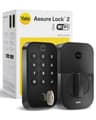
Yale is explicit about this in both directions, and it is the single most expensive mistake people make in this category. Yale’s Google article states that “Your Yale Assure lock must be connected to Wi-Fi using the Wi-Fi Connect Bridge”, and Yale’s own product page explains why: Bluetooth is included on every Assure Lock 2, while the Wi-Fi module upgrade is what unlocks remote access and the additional voice and smart-home integrations. Buy the keyed Bluetooth-only version because it is cheaper and you will own a lock that Google cannot see. Buy the Wi-Fi keypad version— which is the one we link — and the bridge is the lock.
Schlage sidesteps the problem by building it in: Schlage publishes built-in Wi-Fi on the Encode Plus with no additional accessories, which is also why it is the most expensive lock here. August’s fourth-generation Wi-Fi Smart Lock does the same thing — August lists Google Home on the Wi-Fi Smart Lock and the Wi-Fi Smart Lock + Keypad specifically, and the listing we link bundles the Keypad Touch so entry codes and fingerprint unlock are in the box.
The three locks compared
Manufacturer-published figures, read on the date at the top of this page. 'Not mentioned' means the maker does not state it on its own compatibility page — not that it is impossible. | Yale Assure Lock 2 | Schlage Encode Plus | August Wi-Fi Smart Lock |
|---|
| Google support, per the maker | Documented, with the command list | Listed on the works-with page | Listed, as “requires Wi-Fi” |
|---|
| Install type | Replaces the deadbolt | Replaces the deadbolt | Retrofits over your deadbolt |
|---|
| Wi-Fi | In the Wi-Fi module version only | Built in, no accessory | Built in (4th gen) |
|---|
| Other radios | Bluetooth; swappable Z-Wave / Matter module | Thread + Bluetooth | Bluetooth |
|---|
| Also works with | Alexa | Alexa, Apple Home + Home Key | Alexa, Apple Home |
|---|
| Matter | Via the swappable module | Not mentioned by Schlage | Not mentioned by August |
|---|
| Entry codes | Unlimited shared codes | Up to 100 scheduled codes | Guest access via app and keypad |
|---|
| Keypad in the box | Yes, touchscreen | Yes | Yes, Keypad Touch included |
|---|
| Power | 4 x AA | 4 x AA, up to six months typical use | AA batteries |
|---|
| Physical key | Back-up key included | One physical key included | Your existing keys keep working |
|---|
| Monthly fee | None | None | None |
|---|
Read the Wi-Fi row and the Matter row together and the order explains itself. The Yale wins because it is the only lock here that can change radios without being replaced: the module comes out, a Matter or Z-Wave module goes in, and a household that moves off Google in three years has not wasted the hardware. The Schlage wins on everything physical — Schlage publishes an ANSI/BHMA A156.40 Grade AAA rating, up to 100 scheduled codes and a built-in alarm — and it is the only pick that also carries Apple Home Key, which matters in the very common household where the thermostat answers to Google and the phones are iPhones. The August wins on who it suits: it is the only lock here that does not touch the outside of your door, which is the difference between a lock you can install in a rental and one you cannot.
Why the Level Lock+ is not on this page
We cover five smart locks and only three are here. The Level Lock+ hides every component inside your existing deadbolt and is the best-looking lock in the category, but it speaks Bluetooth and gets its remote access through Apple Home, which needs an Apple TV, iPad or HomePod acting as a hub. Our registry lists Apple Home as the only ecosystem it works with. On a Google-first household that is the wrong lock, and listing it with a caveat would be the kind of hedge that wastes your money rather than saves it. The full argument is in our Level Lock+ versus Schlage Encode Plus comparison, where the same design decision reads very differently.
The Wyze fingerprint deadbolt is the other lock we cover and leave off. It is the cheapest way into fingerprint entry and we recommend it on that basis elsewhere, but Wyze does not document Google Home support for it, and a lock whose maker will not put the integration in writing does not belong on a page about documented integrations.
Before you buy: three things to check on your own door
None of this matters if the lock will not fit. Both deadbolt replacements here assume a standard US entry door — Yale publishes that the Assure Lock 2 replaces deadbolts on standard US and Canada entryway doors with an adaptor included for small bore holes. The August avoids the question entirely by keeping your existing exterior hardware, which is covered in full in our guide to whether you can still use a key.
Second, check your Wi-Fi at the door, not in the living room. A lock is usually the furthest device in the house from the router and it is behind a metal deadbolt. Third, decide whether you want the lock to relock itself; all three makers offer it, and the setting that makes it usable rather than maddening is covered in do smart locks lock automatically? Battery life is the last thing people think about and the first thing that annoys them — how long smart lock batteries last has the published figures, and Wi-Fi being on is the reason they are shorter than you expect.