What Alexa can actually do with a smart lock
Three things, and they are worth separating because only one of them is the party trick people imagine.
The first is status. Asking whether the front door is locked, from the kitchen or from bed, is the feature that gets used every single day and the one nobody demonstrates in an ad. It needs the lock to report its own bolt position, which all four picks do through their apps.
The second is locking by voice. Saying “Alexa, lock the front door” is the safe half of voice control: the worst case of a misheard command is a locked door.
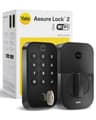
The third is unlocking by voice, which is the half that deserves a thought. Yale publishes it as a feature of the Assure Lock 2 — its page says to “simply ask your voice assistant to unlock your door using Amazon Alexa, Hey Google or Siri” — and the other brands here describe voice control of the lock in similar terms. Whether you enable it is a household decision, not a specification: an Echo near a window or an open porch is a different risk from one in a hallway. The locks do not force the choice on you, and all four keep working exactly the same if you leave voice unlock off and use the keypad, a fingerprint or the app.
What Alexa does not do is give you remote access for free on a lock that has no Wi-Fi. That is the trap in the first section, and it is the reason the Level Lock+ is not on this page at all.
The four Alexa locks compared
Manufacturer-published figures and the live listing, read on the date at the top of this page. Where a brand does not publish a figure we say so rather than estimate it. | Yale Assure Lock 2 | Schlage Encode Plus | August Wi-Fi Smart Lock | Wyze Lock Bolt |
|---|
| Install type | Replaces the deadbolt | Replaces the deadbolt | Retrofits over your deadbolt | Replaces the deadbolt |
|---|
| Wi-Fi in the box | Yes (Wi-Fi keypad version) | Yes, no extra accessory | Yes, built in | Yes |
|---|
| Other radios | Bluetooth; swappable Z-Wave / Matter module | Thread + Bluetooth | Bluetooth | Bluetooth |
|---|
| Works with | Alexa, Google Home | Alexa, Google Home, Apple Home | Alexa, Google Home, Apple Home | Alexa, Google Home |
|---|
| Keypad in the box | Yes, touchscreen | Yes | Yes, Keypad Touch included | Yes, plus fingerprint |
|---|
| Entry codes | Unlimited shared codes | Up to 100 scheduled codes | Guest access via the app and keypad | 4 to 8 digit codes |
|---|
| Power | 4 x AA | 4 x AA, up to six months typical use | AA batteries | Rechargeable, USB-C top-up port |
|---|
| Monthly fee | None | None | None | None |
|---|
Read the second and third rows together and the ranking explains itself. All four get to Alexa without an accessory, so the separator becomes what else the lock is good at. The Yale wins on future-proofing: the radio is a module, so the same lock can move to Z-Wave or Matter later instead of being replaced. The Schlage wins on hardware — Schlage publishes an ANSI/BHMA A156.40 Grade AAA rating, up to 100 scheduled access codes, a built-in alarm and Apple home keys, so it is the one to buy if the household also has iPhones. The August wins on who it suits rather than what it does: it is the only pick that does not touch the outside of your door. The Wyze is here on price and on one feature the others charge much more for, fingerprint entry.
Why the Level Lock+ is not on this list
We cover five smart locks and only four are on this page. The Level Lock+ hides its hardware inside your existing deadbolt and is lovely, but it speaks Bluetooth and gets its remote access through Apple Home, which needs an Apple TV, iPad or HomePod acting as a hub. On an Alexa-first household it is the wrong lock, and listing it with an asterisk would be the kind of padding this site is built to avoid. If you are in fact an Apple household, read the best smart locks for Apple Home instead, where it ranks near the top.
If you have an Echo, you already have part of a security system
An Echo is not a hub for any of these locks — they all reach Amazon over your Wi-Fi — but it is the thing that makes the lock feel like part of the house rather than another app. The pattern worth setting up on day one is a bedtime routine that locks the door, turns off the downstairs lights and arms whatever cameras you have, because it replaces the one job people actually forget. Our guide to smart home automation covers how to build that without turning it into a hobby, and do you need a smart home hub? explains when a Wi-Fi lock is enough and when a real hub earns its place.
Two related pages matter more than they sound. The first is how long smart lock batteries last, because the only recurring cost of every lock here is batteries and the only genuine failure mode is letting them run out. The second is whether you can still use a key, which is the question every member of the household will ask on the day the lock goes on. Yale answers it directly: the Assure Lock 2 keeps working in a power cut because it runs on batteries, and “if the batteries die, you can always dig out your back-up key (included).”
Before you buy: check the door, not just the app
Nothing about Alexa matters if the lock does not fit. Yale publishes that the Assure Lock 2 replaces deadbolts on standard US and Canada entryway doors and includes an adaptor for small bore holes. August takes the other route: because it mounts on the inside over the deadbolt you already have, it publishes a compatibility list of locks it fits rather than a door specification. If your deadbolt is unusual, non-standard or part of a handle set, the August is the safer order, and August vs Yale is the comparison that decides it. Renters have an extra reason to prefer it: nothing visible changes on the door, which is usually the difference between a landlord saying yes and no. Our smart home for renters guide covers the rest of that conversation.