What $200 buys, and what it does not
The good news first. Smart locks are one of the few categories on this site where the under-$200 shelf is not a compromise on the core function. All three picks give you app control, shareable codes or keys, an activity history of who opened the door and when, and voice control through at least Alexa and Google Home. None of them charges a monthly fee for any of that, and none of them paywalls the lock and unlock buttons — which is not something we can say about cameras or alarms at any price.
What $200 does not buy, consistently, is Apple Home Key — the tap-your-iPhone-or-Watch unlock. The two locks we cover that support it both sit above this page’s ceiling: the Level Lock+ and the Schlage Encode Plus, and Schlage’s own compatibility page notes that Home Key “requires a Thread-enabled home hub,” so the lock is not even the whole bill. The August pick below does support Apple Home, which is a different and lesser thing: you can ask Siri and see the lock in the Home app, but you cannot tap the door open with your Watch. If tap-to-unlock is the feature you came for, our Apple Home lock ranking explains which locks genuinely do it, and Level Lock+ vs Schlage Encode Plus is the head-to-head between the two that do.
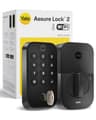
The second thing the budget shelf tends not to buy is a heavily built deadbolt. Yale publishes ANSI/BHMA Grade 2 for the Assure Lock 2, which is the residential standard most smart deadbolts hit; the Schlage above this page’s ceiling is a Grade 1. If your door is the only thing between a busy street and your living room, that difference is worth the extra money. For most front doors, it is not the thing that decides the burglary — our are smart locks safe? guide works through what actually fails.
Criterion one: where the Wi-Fi lives
This is the single most expensive mistake in the category, because a lock that needs a bridge is two purchases pretending to be one.
August. The 4th-generation Wi-Fi Smart Lock builds the radio in, which is the whole reason it replaced the previous generation’s separate Connect bridge. August’s own compatibility page is precise about what that radio is for: it lists “Remote Access (Requires Wi-Fi),” “Works with Google Assistant (Requires Wi-Fi)” and “Works with Amazon Alexa (Requires Wi-Fi)” — so the features you want are the features the built-in radio unlocks, with nothing else to buy.
Yale. Read the version name carefully. Yale states that Bluetooth is included on all Assure Lock 2 products while the Wi-Fi module upgrade is required for remote access and for additional voice and smart-home integrations. The listing priced on this page is the Wi-Fi keypad version, so the module is already in the box — but a cheaper Assure Lock 2 on a shelf somewhere is probably the Bluetooth one, and it will not let you unlock the door from the office. Yale’s Google Home article makes the same point from the other end: “Your Yale Assure lock must be connected to Wi-Fi using the Wi-Fi Connect Bridge.”
Wyze. The Lock Bolt is the cheapest pick here and the one whose published documentation is about getting through the door rather than about radios: Wyze documents fingerprint unlock, a four-to-eight-digit keypad code, app control, and an activity log showing who locked or unlocked the door, when, and by which method. Treat remote control as the thing to verify on the listing before you buy, not as a given.
Criterion two: does your door survive it
Two philosophies, and the cheaper one is not the worse one.
Retrofit — the August. August’s product page describes a lock that attaches to your existing door lock, on the inside of the door, over the deadbolt, “so you can still use your keys.” Nothing changes on the outside of your door: same hardware, same finish, same keys in everyone’s pocket. For a rental, that is the difference between a smart lock and a conversation with your landlord, which is why it leads our beginner picks and why are smart locks easy to install? treats it as the low-risk route.
Full replacement — the Yale and the Wyze. The old deadbolt comes out and the new one goes in, keyhole and all. Yale publishes that the Assure Lock 2 replaces deadbolts on standard US and Canadian entryway doors with an adaptor included for small bore holes, which is the detail that decides whether the job takes twenty minutes or a trip to the hardware store. You get a cleaner result and a keypad that is part of the lock rather than a second thing to mount on the wall — the August’s Keypad Touch is a separate unit you site within Bluetooth range of the lock. August vs Yale is the long-form version of this exact decision.
Criterion three: the day the batteries die
Every lock here runs on batteries, so this is not a hypothetical. It is a Tuesday in February.
Yale is the most reassuring on paper, and for a boring reason: the lock is battery powered, so you keep access during a power outage, and Yale states that “if the batteries die, you can always dig out your back-up key (included).” Four AA cells, a physical key in a drawer, done. Wyze solves the same problem differently — its page states that if the batteries die while you are away, the USB-C port allows an instant, brief charge for you to enter your home, with a low-battery indicator that flashes red before you get there. That works, but it assumes you are carrying a power bank or can borrow one, and the registry entry for this lock flags checking the variant for a backup physical key before you buy.
The August is in a third position, and it is the one most people misread: because it retrofits over your existing deadbolt, your original key still works from the outside. The failure mode of a retrofit lock is not being locked out, it is being locked out of the smart features. For how long these actually last, our smart lock battery life guide collects what each maker publishes, and do smart locks work without power? covers the wider outage question.
The full comparison
Manufacturer-published figures and our registry's dated listing reads only. 'Not published' means the maker does not state it — we do not fill those in from a retailer listing. | August Wi-Fi (4th gen) | Wyze Lock Bolt | Yale Assure Lock 2 |
|---|
| Price band on this page | Middle of the three | Cheapest | At the ceiling |
|---|
| Install type | Retrofits over your existing deadbolt | Replaces the deadbolt | Replaces the deadbolt |
|---|
| Your existing key still works | Yes — August says "so you can still use your keys" | No — new lock, new key situation | No — but a back-up key is included |
|---|
| Keypad | Keypad Touch included, mounted separately | On the lock | On the lock (touchscreen) |
|---|
| Fingerprint | On the included Keypad Touch, per the listing | Yes, on the lock | Not published |
|---|
| Remote access needs | Built-in Wi-Fi — August lists remote access as "Requires Wi-Fi" | Verify on the listing | The Wi-Fi module, included on this version |
|---|
| Apple Home | Listed by August for this lock | No | Not on this version |
|---|
| Apple Home Key (tap to unlock) | No | No | No |
|---|
| Alexa / Google Home | Both, per August's works-with page | Both | Both, plus Siri voice unlock per Yale |
|---|
| Power | AA batteries | Rechargeable, with USB-C emergency charge | Four AA batteries |
|---|
| ANSI/BHMA grade | Not published | Not published | Grade 2, per Yale |
|---|
| Monthly fee | None | None | None |
|---|
| Future-proofing | Wi-Fi is built in; no module system | None published | Swappable radio module (Z-Wave / Matter versions exist) |
|---|
Why the August wins under $200
Because it is the only pick here that cannot go wrong. It does not touch the outside of your door, it does not retire anyone’s key, it carries its own Wi-Fi, and the current listing bundles the keypad so the household members who do not want an app on their phone have a way in. If you rent, it is the only one of the three you can fit and then un-fit when you move. And at roughly the middle of this page’s price range, it costs less than the full-replacement pick at the ceiling.
The honest cons. The interior escutcheon is bulky — this is a module bolted over your deadbolt and it looks like one. Battery life is only okay with the Wi-Fi radio awake, which is the standing trade for not buying a bridge. The keypad is a separate unit to mount and keep within Bluetooth range of the lock, not part of the lock itself. And August’s remote access, Alexa and Google integrations are all published as requiring Wi-Fi, so a dead router is a dumb lock until it comes back — your key still works, which is exactly why we rank the retrofit first.
Why the Wyze is the right answer at half the money
Fingerprint entry is the feature people actually use every day, and the Lock Bolt is the cheapest way to have it on a front door. Wyze documents a fingerprint reader, a four-to-eight-digit code, app control and an activity log that records who opened the door and by which method — which is the complete set of things a household needs from a smart lock, minus the polish. If your budget is the constraint rather than the ecosystem, buy this and spend the difference on a no-fee video doorbell instead.
The honest cons. The build is plastic-heavy next to the Yale, and you will feel it. There is no Apple Home support at all, so an iPhone household gets the app and nothing in the Home app. Check the specific variant for a backup physical key before you order — the USB-C emergency charge is a good safety net but it is not the same as a key in a drawer. And Wyze’s security history is mixed; our device security guide covers what to do about that for any brand.
Why the Yale is the one to stretch for
It is the best-made lock under this ceiling and the only one with a published grade behind that claim: ANSI/BHMA Grade 2, four AA cells, a touchscreen keypad that is part of the lock, unlimited shared codes, Auto-Lock with DoorSense, and Alexa, Google and Siri voice control. The swappable radio module is the quiet argument for it — if your house moves to Matter or Z-Wave in three years, you change a module rather than rebuy a deadbolt. Over a ten-year lock, that is the cheapest pick on this page.
The honest cons. It sits right at the $200 line, so on a bad day it is not an under-$200 lock at all — check the live price. Wi-Fi drains batteries faster than a hub connection would. The module system means you have to buy the right version: Yale states that Bluetooth is on every Assure Lock 2 and the Wi-Fi module is what adds remote access and the extra integrations, so a cheaper listing of the “same” lock may not do what this page says. And the interior is bulkier than a bare deadbolt, though neater than the August’s.
What we left off, and why
The Level Lock+ and the Schlage Encode Plus. Both are locks we cover and rate, and both were above $200 when we priced this page — the Level by a little and the Schlage by a lot. They are also the two that support Apple Home Key, which is the main reason to go over this ceiling at all. See our overall smart lock ranking for where they land.
Lock-only listings and bare bundles. We only rank a product when there is a live, currently-purchasable listing we can price, and bundles move. The August entry here is the Yale-branded listing of the same lock bundled with the Keypad Touch, because the lock-only listing for this model is no longer stocked; that is the configuration priced above.
No-name fingerprint deadbolts. There is a large shelf of $60 smart locks from brands with no published spec sheet, no documented firmware policy and no support history. We will not rank a lock on your front door from a maker who does not publish what it does.
So which one
Most people, and every renter: the August. Keeps your keys, keeps your exterior hardware, brings its own Wi-Fi and comes with a keypad.
Spending as little as possible: the Wyze Lock Bolt. Fingerprint entry for roughly half the page’s middle price, minus Apple Home and minus the heft.
Buying a lock to keep: the Yale Assure Lock 2. Graded hardware, a keypad in the lock, and a radio module you can swap instead of replacing the whole deadbolt.
If none of these fit your door or your ecosystem, the two pages to read next are our keypad and fingerprint lock ranking for entry methods specifically, and are smart locks worth it? if you are still deciding whether to buy one at all. Hosts should start at our Airbnb and rental lock picks, where per-stay codes matter more than price.