How to choose a video doorbell
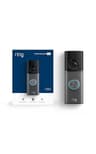
Start with the subscription question, because it’s the biggest hidden cost and the clearest divider between these three. If you want recordings with no monthly fee, the eufy Video Doorbell E340 stores video on built-in local storage — expandable with a eufy HomeBase — and never asks for a plan. If you already live in the Ring and Alexa world and don’t mind the bill, Ring’s Wired Doorbell Pro is the most polished option, but its clips exist only in the cloud behind a Ring Protect plan. Wyze is the budget middle ground: it offers a free event tier and a paid one, so confirm which recording option you’ll actually use before you buy.
Wired or battery?
Where the doorbell gets its power decides how you install it. The Ring Wired Doorbell Pro uses your existing doorbell wiring, which means constant power and no recharging — but you need that wiring to be there. The eufy runs wired oron a rechargeable battery, and the Wyze is fully wireless on a rechargeable pack, so both go up on a door with no wiring at all. If you have no chime wiring and don’t want to add any, a battery model is the practical answer; if you have the wiring, a wired doorbell means never thinking about charging.
Field of view and package detection
The thing you want to see at a front door isn’t just a face — it’s the package sitting on the step. A tall, “head-to-toe” field of view matters more here than raw resolution, because it lets the camera show a delivery on the ground as well as a visitor at the button. Ring’s Pro has a head-to-toe view; the eufy takes a different route with a second camera aimed down at the doorstep specifically for packages; and the Wyze uses a tall 1:1 aspect ratio for the same reason. Whichever you pick, secure the account: a strong, unique password and two-factor authentication keep a doorbell camera from becoming a liability, as the FTC lays out in its guidance on home cameras. If you run more than one brand of camera, the compatibility matrix shows which ecosystems each doorbell fits. If you have not decided whether to buy one at all, our are video doorbells worth it? guide makes the case both ways, including the wiring each model needs.
If the monthly fee is the part you will not accept, this list is wider than you need: the best video doorbells without a subscription drops every cloud-only option and ranks only the four whose makers state in writing that the recordings land on hardware you own — including the cheapest one with free person, pet, vehicle and package detection, and the only no-fee doorbell that works with Apple Home.