Question one: where does the signal come from?
There are only three honest answers for a vehicle, and picking the wrong one is how people end up with a camera that works in the driveway and nowhere else.
Its own cellular connection. The camera has a SIM and a data plan, independent of everything else. This is the only option that works in a storage lot, on a boondocking site, or while the rig is parked somewhere you are not. It is also the only option that costs money every month, and that cost is a carrier bill rather than a camera subscription — which is a distinction this site cares about, because you cannot cancel it and keep the feature.
Your hotspot or the campground Wi-Fi. Cheaper hardware, no second data plan if your phone plan already has a hotspot allowance, and it works well when you are at the rig. It stops working the moment you drive away with the hotspot in your pocket, which is precisely when most people want the camera.
No network at all. A camera recording to a card with nobody watching is not useless — it is a dashcam-style evidence box. You find out what happened when you get back. For a stored rig this is a legitimate choice, and it is free.
Match the answer to the actual scenario. Rig in storage nine months a year: cellular. Rig at a site you are living in: hotspot. Rig in your own driveway: your house Wi-Fi probably reaches, and you should buy from our wireless camera ranking instead of paying the cellular premium.
Question two: where does the power come from?
A parked RV has no mains power unless it is plugged in, and the house battery is for the fridge. That rules out every wired camera for exterior use and makes solar the default, not a luxury.
eufy publishes the numbers that make this workable on the S330: a 9,400mAh battery, an “upgraded solar panel”, and the claim that “Two hours of solar charging daily under optimal conditons can keep the camera powered indefinitely” — eufy’s spelling, and eufy’s definition of optimal, which is doing some work in that sentence. Without any solar input eufy estimates roughly a month of runtime under its own usage pattern. Reolink publishes a solar panel for the Argus PT Ultra on the same principle.
Two practical notes neither maker will tell you. A solar panel on a vehicle needs to point at the sky from a surface that moves, so the mount matters more than it does on a house wall. And a stored rig is often stored under cover or against a building, which is the one situation where solar quietly fails — if that is you, plan on pulling the camera and charging it on a schedule, and read the battery runtime as the real number rather than the solar claim.
The cellular pick, in detail
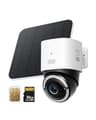
The eufy 4G LTE Cam S330 earns the top slot on published facts rather than on our enthusiasm, so here is what eufy actually states.
The SIM is the product. eufy publishes that “The included 3-in-1 SIM card is compitable with AT&T, T-Mobile, and Verizon” [their spelling], that the camera “Supports Nano SIM cards and 4G bands in the U.S., including B2/B4/B5/B12/B13/B14/B66/B71”, and — the detail worth knowing before you buy a SIM — that “It is compatible with 5G SIM cards but will be limited to 4G.” Three carriers on one included SIM is the single most useful thing about this camera for an RV, because the whole point of a vehicle is that it moves between coverage areas.
Data use. eufy estimates “around 700 MB per month”. That is eufy’s stated usage pattern, not yours: a camera on a busy campground loop with vehicle detection firing all day will use more than one watching an empty storage bay. Treat 700MB as the floor for budgeting a plan, not the expected bill.
Wi-Fi is the fallback, not the requirement. eufy publishes that “If Wi-Fi signal is lost, the auto-switching 4G feature swaps to mobile data”, which is the right way round for a vehicle — use the campground network when it is there, fall back to the carrier when you drive off. Note the one limitation: eufy states it works with HomeBase S380 “when connected via Wi-Fi”, so the base-station route is not available over cellular.
What it sees. 4K, with eufy’s own framing of what that buys you: “The color 4K camera gives you the clarity to identify a license plate 30 feet (10 meters) away.” 4K Color Night Vision via a 100-lumen spotlight that eufy rates for color detail “up to 26 feet (8 meters) away”. Pan and tilt marketed as “360° Viewing”. AI that “detects and tracks people, and vehicles”, plus Activity Zones. Operating range is published as -4°F to 122°F, which covers most of what an RV meets.
And now the gaps, because this is where we differ from the rest of the category. eufy publishes no IP weather rating for this camera — unusual for the brand, which publishes IP67 on the eufyCam S330 and IP65-class ratings elsewhere. It publishes no pan or tilt degrees, no numeric field of view, no solar panel wattage, no Wi-Fi standard, and no maximum microSD capacity, nor whether a card is in the box. It does state that NAS storage is not supported. We are not going to fill any of that in from a retailer listing. If a published weather rating is a hard requirement for where you are mounting it, that absence is a genuine reason to look at the Reolink instead — and our guide to camera weather ratings collects every rating in our registry in one table.
The subscription position is the one we like: a eufy Plus Membership adds cloud backup history, and eufy does not make it a requirement for the camera to record. The cost you genuinely cannot avoid is the data plan.
The hotspot pick, and why it is often the smarter buy
If you are in the RV, you almost certainly have a hotspot already, and in that case paying the cellular-camera premium buys you very little. The Reolink Argus PT Ultra is the better hardware for the money on Reolink’s published specs: 4K at 15fps, 355° pan and 140° tilt, a 110° diagonal view, two 6500K spotlights reaching 33ft plus two 850nm infrared LEDs, PIR detection, microSD up to 512GB, dual-band Wi-Fi, IP65, and a solar panel.
Three of those matter specifically on a vehicle. The 355° pan means one camera covers the door side, the awning and the vehicle behind you instead of two fixed cameras. 512GB of card is four times what the cheap cameras take, which is how you get weeks of events instead of days. And dual-band Wi-Fi is quietly important: a crowded campground is a 2.4GHz traffic jam, and the 5GHz option is a real advantage when every rig on the loop is running a hotspot.
The honest cons: it is Wi-Fi only, so it stops seeing anything the moment the hotspot leaves with you — it keeps recording to the card, but you are not watching. The card is in the camera, so if the camera goes, the footage goes with it. And it is a battery camera, which means event capture rather than a continuous archive.
Inside the rig
The interior is a different job: usually it is about a pet, a fridge, a water leak you want to see, or just knowing nobody is inside. It is also the one place in an RV with a reliable outlet when you are hooked up or running an inverter, which changes the shortlist entirely.
The Wyze Cam v4 is the pick on cost and on storage honesty. Wyze publishes 2.5K QHD, a starlight sensor with color night vision, four 850nm IR LEDs plus two spotlight LEDs, a 115.8° diagonal view, 24/7 local recording to microSD up to 256GB, a 99dB siren and IP65 — and separately states that every Wyze Cam has a microSD slot, that you can choose Continuous or Events Only recording, and that local storage is free. Continuous recording is the thing a battery camera cannot do, and it is why a powered interior camera is a genuinely different tool rather than a cheaper version of the same one.
Cons: it is USB-wired, so it is only an option when you have power; the smarter AI nudges you toward paid Cam Plus; and Wyze’s track record on security incidents is mixed, which we cover in our Wyze Cam review rather than glossing over. If you want an interior camera that works unplugged, you are back to a battery model and back to event-only recording.
The three picks, scored for a vehicle
Rows are read from each maker's own product and support pages on the dates in the sources below, via our registry. 'Not published' means we found no first-party figure — it is not a claim the feature is missing. None of these is a dash camera or a GPS tracker, and none records while the vehicle is in motion. | eufy 4G LTE Cam S330 | Reolink Argus PT Ultra | Wyze Cam v4 |
|---|
| Works with no Wi-Fi at all | Yes — included 3-in-1 SIM (AT&T, T-Mobile, Verizon) | No | No |
|---|
| Needs a data plan | Yes — eufy estimates around 700MB/month | No, if you already have a hotspot | No |
|---|
| Power | 9,400mAh battery + solar panel | Battery + solar panel | Wired USB only |
|---|
| Local storage | microSD slot — maximum not published | microSD up to 512GB | microSD up to 256GB |
|---|
| Continuous 24/7 recording | No — battery, event-based | No — battery, event-based | Yes — Wyze publishes 24/7 local recording |
|---|
| Published weather rating | Not published | IP65 | IP65 |
|---|
| Coverage per unit | Pan and tilt, marketed as 360° — degrees not published | 355° pan / 140° tilt, 110° diagonal | 115.8° diagonal, fixed |
|---|
| Resolution | 4K | 4K at 15fps | 2.5K QHD |
|---|
| Wi-Fi band | Not published | 2.4 / 5GHz dual-band | 2.4GHz only |
|---|
| Monthly fee for recording | No — plan is optional | No | No — Wyze states local storage is free |
|---|
| Footage survives the camera being taken | No — card is in the camera | No — card is in the camera | No — card is in the camera |
|---|
Two rows are worth a second look. The last one is the same for all three, and it is the one RV owners should sit with: in a vehicle the camera itself is the vulnerable object, and every pick here keeps its footage inside the camera. A base station solves that in a house — eufy’s HomeBase route exists, but eufy states the S380 pairing works over Wi-Fi, not over cellular, so it does not solve it here. And “continuous 24/7 recording” is the row that explains why the cheapest camera on the page is on it at all: a powered camera does a job the battery ones structurally cannot.
What we would actually fit
One cellular camera, mounted high on the entry side with the solar panel pointed at open sky, watching the door and the hitch. That is the camera that works when you are not there, which is the whole problem. Then, if the rig is lived in rather than stored, one Wi-Fi pan camera on the hotspot covering the awning and whatever is parked behind you, and a cheap powered camera inside for the pet or the fridge.
Three things that are not cameras and matter more than a fourth camera would. A lock. The storage bay is usually where the valuable things are, and it is worth checking what the factory hardware on yours actually is before you spend on a camera to watch it. Nothing in our registry is an RV-specific lock and we are not going to invent one, so we have no pick to offer here — only the suggestion that the compartment is worth looking at. A published weather rating on anything you mount outdoors, which is the single reason the Reolink may beat our top pick for your install. And account security, because a camera in a vehicle is reachable from anywhere by anyone who has your password — the FTC publishes consumer guidance on exactly that, and our guide to securing smart home devices is the ten-minute version.
Finally, the honest limit of this page. We found no camera in our registry designed to record while driving, and no RV-specific mount or 12V integration we could cite from a maker. If you want footage of the road, that is a dash camera and a different purchase. What the cameras here do well is watch a parked vehicle, which is the scenario an owner can actually do something about — and the one where there is nobody around to notice. We have no figures on where RV break-ins happen and are not going to invent any. If you are also kitting out a property rather than a vehicle, our no-subscription camera ranking and the do security cameras need Wi-Fi guide cover the same connectivity question for a house.