The feature map: what you are actually replacing
A security camera is not one product. It is six jobs in a weather-resistant shell, and leaving Ring goes wrong when you replace the shell and forget one of the jobs. Here is each one.
Recorded video history. Ring’s paid tiers publish up to 180 days of playback on the Solo and Multi plans. No local-storage camera can quote a number like that, because the number depends on your card and your traffic. What they quote instead is capacity: Wyze publishes microSD support up to 256GB and says local storage is free, TP-Link publishes up to 512GB on the Tapo C120, Reolink describes its card slot under the heading “Smart Detection, No Monthly Fees” with “No internet or cloud subscription required”, and eufy puts 16GB inside the HomeBase 3 with expansion “up to 16TB of expandable storage on a portable hard drive.” The trade runs both ways and we will not pretend otherwise: Ring’s 180 days are guaranteed and off-site, so a thief who takes the camera does not take the evidence. A card is free forever and sits in your hallway.
Smart detection. This is the single biggest saving. Ring lists person, package and vehicle alerts as plan features, and its blog confirms person detection is what the plan adds. Reolink publishes its detection list as “PIR Detection/Human Detection/Vehicle Detection/Pet Detection” on the camera itself, with the PIR range published as “Adjustable up to 10m (33 ft)” across a 120° horizontal detecting angle and pet detection labeled beta and limited to cats and dogs. eufy publishes its AI list as “Face/Human/Vehicle/Pet.” Neither charges for it. That is the clearest like-for-like win on this page.
The siren. Ring publishes a remote-activated siren and no decibel figure for it. Wyze publishes 99dB on the Cam v4 and TP-Link publishes 96dB on the C120 — two of the cheapest cameras here are the only two on this page with a measured number.
The Alexa announcement. Ring and Alexa are the same company, and that integration is the thing a third party cannot match. Blink is the closest, for the same reason — it is also Amazon. If an Echo Show calling out the back door is why you bought Ring, read our Alexa camera ranking before you switch anything.
Professional monitoring. Nothing on this page replaces it. Ring Pro publishes 24/7 professional monitoring in all 50 states and Canada excluding Quebec, and a camera is not a monitored alarm no matter whose it is. If a staffed center is the feature you are actually buying, the page you want is our home security system ranking, not this one.
A copy of the video you control. Home Assistant documents the Ring integration’s IoT class as Cloud Polling and states plainly that “Downloading and playing Ring video from the last_recording camera will require a Ring Protect plan.” For Reolink it documents Local Push instead, with camera streams, motion and AI person, vehicle and pet binary sensors, PTZ buttons and a media browser for recorded playback, and says it works with the internet blocked. That is the difference between renting access to your footage and owning it.
Side by side, using only what each maker publishes
Published specifications only. 'Not published' means the maker does not state the figure on the pages we read — it is not an estimate of ours.| Spec | Ring Outdoor Cam | Wyze Cam v4 | Reolink Argus PT Ultra | Tapo C120 | eufyCam S330 | Blink Outdoor 4 |
|---|
| Resolution | 1080p | 2.5K QHD | 4K at 15fps | 2K (4MP) | 4K | 1080p |
|---|
| Field of view | 110° H / 57° V | 115.8° diagonal | 110° diagonal | 120° diagonal | 135° (F1.4) | 143° diagonal |
|---|
| Card slot / local storage | None published | microSD to 256GB | microSD (page says both 128GB and 512GB) | microSD to 512GB | 16GB in HomeBase 3, to 16TB | USB or microSD, Sync Module 2 / XR only |
|---|
| Recorded history with no plan | No | Yes | Yes | Yes | Yes | Local Storage only, never on Sync Module Core |
|---|
| Person detection with no plan | No | Yes | Yes (Human) | Yes | Yes (Human) | Not published |
|---|
| Siren | Yes, no dB published | 99dB | Not published | 96dB | Via HomeBase | Not published |
|---|
| Wi-Fi | 2.4GHz only | 2.4GHz only | 2.4GHz / 5GHz | 2.4GHz only | 2.4GHz only | 2.4GHz only |
|---|
| Weather rating | Not published | IP65 | IP65 | IP66 | IP67 | Not published |
|---|
| Operating range | −5°F to 122°F | Not published | Not published | Not published | Not published | −4°F to 113°F |
|---|
| Pan / tilt | No | No | 355° / 140° | No | No | No |
|---|
| Solar option | Yes, sold separately | No | Yes | No | Built in | No |
|---|
| Home Assistant class | Cloud Polling | Not documented | Local Push | Not documented | Not documented | Cloud Polling, no live view |
|---|
Two things in that table are worth saying out loud. The first is that Ring is the only camera here with no published weather rating and no card slot, and the only one whose recorded history is a subscription rather than a component. The second is that Ring is also one of only two cameras here that publishes an operating temperature range at all — the cheap end of this market is thin on cold-weather figures, and if you live somewhere genuinely cold that matters more than a megapixel count. Our weatherproofing guide explains what an IP number does and does not promise.
Criterion one: where the footage lives
This is the whole page, really. Ring stores in the cloud and sells you access to it. The five picks here store on hardware you bought, which has three consequences people do not expect.
You get continuous recording, or you do not. Wyze publishes Continuous and Events Only as a choice on every Wyze Cam with a card in it, which is 24/7 footage for no fee — something Ring does not sell at any tier. TP-Link is explicit in the other direction: continuous recording needs a microSD card or a Tapo Hub, and its battery-powered cameras do not support it at all. eufy is explicit too, stating that a battery camera will not record continuously even when it is connected to a HomeBase 3. So “local storage” and “always recording” are two different features, and only the wired picks here give you both.
Cards fail, and nobody tells you. A cloud recording is somebody else’s problem to keep. A card in a camera on a wall is yours, and it will eventually wear out silently. If your reason for leaving Ring is cost, budget a card replacement every couple of years and you are still far ahead. If your reason is that you want the only copy to be yours, understand that the only copy being yours is the risk as well as the point.
A stolen camera takes its own evidence. This is the real argument for Ring’s model and the honest reason we do not tell everyone to leave. The eufy pick below is the one that answers it: the cameras talk to a HomeBase 3 indoors, so the recording is in the house rather than on the wall. For a single standalone camera over a door, it is a trade you are making whether you notice it or not.
Criterion two: what it costs over five years
Ring publishes its tiers, so this is arithmetic rather than estimation. Solo is $4.99 a month or $49.99 a year, Multi is $9.99 a month or $99.99 a year, Pro is $19.99 a month or $199.99 a year, and Ring states “One device or location covered per plan” — which is why the Solo column below is the one that misleads people with more than one camera.
Plan arithmetic using Ring's own published annual prices, read on the date at the top of this page. Hardware is excluded on both sides because it varies; a microSD card is the only recurring cost on the alternatives, and we treat it as one card replaced once in five years.| Five-year running cost | Ring Solo (annual) | Ring Multi (annual) | Any pick on this page |
|---|
| Year 1 | $49.99 | $99.99 | One card, bought once |
|---|
| Year 3 total | $149.97 | $299.97 | Same card |
|---|
| Year 5 total | $249.95 | $499.95 | Two cards at most |
|---|
| Cameras covered | One device or location | Your whole location | Every camera you own |
|---|
Five hundred dollars is the number to sit with. That is the Multi plan over five years, not counting hardware, and it is the same order of magnitude as the entire four-camera eufy kit on this page, bought once. It is many times over what the Tapo costs, and several times over what the Wyze costs. We are not claiming Ring is bad value — 180 days of off-site history and a monitored tier are real things to buy. We are claiming the decision deserves the actual figure, which is what our running-cost guide does across every category on this site. Two sibling pages do the same arithmetic elsewhere in the house: Philips Hue alternatives for lighting, and smart thermostats under $100 for the one category where even the premium brands charge nothing monthly.
Why the Wyze is the closest straight swap
If you want the Ring experience minus the bill, this is the pick. Wyze publishes 2.5K QHD on the Cam v4 against Ring’s 1080p, a starlight sensor with color night vision, four 850nm infrared LEDs plus two spotlight LEDs, a 115.8° diagonal view, a 99dB siren, IP65, and 24/7 local recording to a microSD card up to 256GB. Wyze also publishes, in plain words, that local storage is free and that every Wyze Cam has the slot. It costs a fraction of the five-year Multi plan, and it is sharper than the camera it is replacing.
The honest cons. It is 2.4GHz only, same as the Ring, so a far corner of the yard is a gamble on both. Wyze’s security history is mixed and we say that on every page that features it — our device security guide covers what to do about that for any brand. There is no Home Assistant integration documented for it, so if local control through your own server is the goal, the Reolink below is the pick, not this one. And Wyze sells its own cloud tier; the free path is the card, and you have to choose it.
Why the Reolink is the one for people leaving over privacy
Reolink publishes 4K at 15fps, 355° of pan and 140° of tilt, two 2.4W 6500K spotlights alongside 850nm infrared, both 2.4GHz and 5GHz Wi-Fi, IP65, and a solar panel option with USB charging as the fallback. It is the only pick here that Home Assistant documents as Local Push rather than Cloud Polling, with motion and AI person, vehicle and pet sensors, PTZ controls and a media browser for recorded playback — and HA states the integration works with the camera’s internet access blocked entirely. If the autocomplete entry you typed was about privacy or data sharing rather than about money, that sentence is the one that matters: it is the only camera on this page you can run with no path to anyone else’s servers at all. The Home Assistant camera ranking goes deeper on how that is set up.
The honest cons. Reolink’s own page contradicts itself on card capacity — the spec table says “Supports up to 128GB microSD card” while the highlights and FAQ say 512GB — so buy a 128GB card and you are certainly fine. The fixed lens is narrower than everything else here at 90° horizontal, which pan and tilt compensates for only while you are watching. It publishes no siren decibel figure. Pet detection is labeled beta and covers cats and dogs only. And the FTC’s own camera guidance is worth reading before you point any of this at a street.
Why the Tapo is the cheapest exit
This is the budget pick, and it is not a token one. TP-Link publishes 2K QHD at 4MP, a starlight sensor with full-color night vision, 850nm and 940nm infrared LEDs rated to 30 feet, a 120° diagonal view, microSD support up to 512GB, a 96dB siren and IP66 — a higher ingress rating than anything else on this page except the eufy. It is sharper than the Ring it replaces and costs less than one year of the Multi plan.
The honest cons. It is a wired camera, so a socket decides where it goes; there is no battery or solar story here at all. Continuous recording needs the card or a Tapo Hub, per TP-Link’s own support page. It is 2.4GHz only. And the cheapest camera in a category tends to come with the thinnest support experience if it fails in year three. See our overall camera ranking for where it lands against cameras at every price.
Why the eufy kit is the whole-house answer
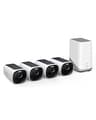
Everything above replaces one Ring camera. This replaces a Ring household, and it is the pick that answers the strongest argument for Ring’s cloud. eufy publishes 4K, infrared and color night vision with motion-activated spotlights and a starlight sensor, an F1.4 135° lens, IP67, an integrated solar panel it describes as “only needing 2 hours of daily sunlight”, and an AI list of “Face/Human/Vehicle/Pet” with no fee attached. The recordings go to a HomeBase 3 inside the house — 16GB on board, expandable “up to 16TB of expandable storage on a portable hard drive” — so taking the camera off the wall does not take the footage.
The honest cons. It is by far the most expensive thing on this page, and the whole point of the page is usually to spend less; it makes sense against five years of Ring Multi across several cameras, not against one camera. eufy states that a battery camera will not record continuously even on a HomeBase 3, so this is event capture, not 24/7. The hard-drive expansion is fussier than it sounds — eufy’s FAQ limits it to a 5V 2.5-inch SATA drive and states 12V drives are not supported. And eufy’s own page is internally inconsistent on sensing, describing “Radar and PIR motion sensing” in one place while its comparison table lists eufyCam 3 motion detection as PIR only; we report both rather than pick the flattering one. The full eufyCam S330 review has the rest.
Why the Blink is here at all, and the thing to know first
Blink is the pick for the household that is leaving the Ring plan rather than the Amazon ecosystem, because the Alexa integration survives the switch. Blink publishes 1080p, a 143° diagonal view — the widest here — two AA lithium batteries rated up to two years, and an operating range of −4°F to 113°F. And we will say the obvious thing first: Blink is owned by Amazon, exactly like Ring. If your reason for leaving is privacy or data sharing rather than cost, this pick does not address it and the Reolink above does.
The honest cons, and one trap. The trap is the Sync Module. Blink’s own support page states that “Sync Module Core does not support Local Storage or Clip Backup” — and Core is what ships in many kits. Local storage needs a Sync Module 2 with a Type-A USB drive or a Sync Module XR with a microSD card, both capped between 1GB and 256GB, so check which module is in the box you are buying. Beyond that: it is 1080p where everything else here is 2K or 4K, it publishes no IP rating and no siren figure, Clip Backup is the subscription half of the feature, and Home Assistant documents the integration as Cloud Polling and states plainly that it “does NOT allow for live viewing of your Blink camera within Home Assistant.” Our eufy vs Blink comparison works through the storage question in detail.
What we left off, and why
The Arlo Pro 2K (6th Gen). It is a camera we cover and rate, with 2K HDR and a 160° field of view, and it is deliberately not a pick here — because it keeps the trade you are trying to escape. Arlo’s own support page states that local storage is a second location for recordings and cannot be used on its own as a substitute for cloud recording, and that only automatically triggered recordings save locally. Arlo also publishes that without a plan you keep live streaming and two-way audio, which is close to Ring’s own planless list. Swapping Ring for Arlo changes the logo on the subscription. Our Ring vs Arlo comparison is the page for that decision.
The eufy 4G LTE Cam S330. A genuinely good answer to a different question — a site with no Wi-Fi and no power, where it runs on a SIM and a solar panel. If that is your problem rather than the monthly fee, the review is here.
Ring’s own cheaper tiers. We did not treat downgrading as an alternative, because Ring’s blog is clear that no plan means no recorded history at all, and the Solo tier covers “one device or location” — so for a multi-camera house the cheap tier is not the cheap option. If you are keeping Ring, keep it on the tier that actually matches the number of cameras you own.
No-name cameras. There is a large shelf of outdoor cameras from brands with no published spec sheet, no stated firmware policy and no support history. We will not rank a camera pointed at your front door from a maker who does not publish what it does.
When you should stay with Ring
Three honest cases. You want a monitored alarm. Ring Pro publishes 24/7 professional monitoring across all 50 states and Canada excluding Quebec, and nothing on this page replaces a staffed center. Your house already runs on Echo devices. Announcements, routines and Show feeds are tighter in Ring and Blink than anywhere else, and the switching cost is real. You want the recording to survive the camera. Off-site storage is the one thing a card cannot do, and only the eufy kit here answers it by moving the storage indoors.
And one more: if the camera is already on the wall and already working, the cheapest change is often not a new camera. Ring lets you turn Audio Streaming and Recording off per device under Device Settings, though its own article notes you must have a compatible subscription to change that setting, and Privacy Zones hide blocked areas in live and recorded video — two per device, permanent in the recording, with motion still detected behind them. That is a smaller lever than switching brands, and for some households it is the right one.
So which one
Most people: the Wyze Cam v4. Sharper than the Ring, records 24/7 to a card for nothing, keeps a measured siren, and costs less than one year of the plan you are canceling.
Leaving over privacy or wanting your own server: the Reolink Argus PT Ultra. 4K, pan and tilt, free human and vehicle detection, and the only Local Push integration here.
Spending as little as possible: the Tapo C120. 2K, IP66, a 96dB siren and a 512GB card ceiling for about what a few months of Ring Solo costs.
Replacing several Ring cameras at once: the eufyCam S330 kit. 4K, solar, free AI detection, and storage that lives indoors rather than on the wall.
Staying in the Alexa world: the Blink Outdoor 4. Widest view here and two-year batteries — buy the Sync Module 2 or XR, not Core, or local storage does not happen.
If what you actually want is the no-fee question answered across every camera we cover rather than Ring specifically, start at our no-subscription camera ranking. If you are replacing a Ring doorbell as well as a Ring camera, the companion page is Ring doorbell alternatives, and if the monthly fee is the whole problem, SimpliSafe alternatives applies the same arithmetic to alarm kits.