What a Nest Cam does for you — and who takes each job
Job one: show you the live view from anywhere. Google lists Live View as a foundational feature available with no subscription, and every camera on this page does the same thing from its own app. This job is a tie, and it is worth saying so, because it is the job people test in the first ten minutes and then assume the rest works the same way.
Job two: keep a history of what happened while you were out. This is the job the whole category is really sold on, and it is where Nest and everything here diverge. On Nest, history is a cloud service with a clock on it: three hours of event clips with no plan on the Nest Cam (wired), Nest Cam (battery) and Nest Cam with floodlight, six hours of ten-second previews on the two newest wired models, 30 days of five-minute event recordings on the Standard plan and 60 days on the Advanced plan. On the Reolink, Wyze and Tapo picks, history is a microSD card in the camera, and the clock is simply how big a card you bought. On the eufyCam kit, it is the HomeBase in your cupboard.
Job three: let you hold the footage. No Nest camera does this job at all, and this is the honest headline of the page. Google’s own storage article lists the cameras that buffer events to internal memory when they go offline — the Nest Cam Indoor (wired, 3rd gen), Nest Cam Outdoor (wired, 2nd gen), Nest Cam (wired), Nest Cam (battery) and the three Nest Doorbells — and then states two things about that memory in the same breath: it holds up to one hour of events, and it “is not accessible” to you. When the camera reconnects, Google documents that the clips upload to the cloud and are removed from the camera. That is a resilience feature, not storage you own, and it is the right way to read it. Every pick here inverts that: the recording starts on hardware in your house and only leaves if you send it somewhere.
Job four: record continuously rather than in clips. Google publishes 24/7 video history as a 10-day rolling history on the Advanced plan, with a footnote that matters more than the price: “24/7 video history is only available for wired Google Nest cameras and doorbells.” So continuous recording on Nest needs two things at once — the dearer plan and a camera with a cable. The Wyze Cam v4 records continuously to its card with no plan at all, which is why it holds the wired-Nest award here even though it is the least exciting camera on the list. The battery picks are event-clip cameras, same as a Nest Cam (battery) is, and we say so rather than implying a battery camera can watch all day.
Job five: tell a person from a car from the cat. Google splits intelligent alerts across its plans and publishes the exceptions rather than hiding them: familiar face detection carries the footnote that it is not available for cameras and doorbells in the U.S. state of Illinois, and garage door detection, smoke and CO sound alerts and emergency calling are each published as US-only. The alternatives handle this unevenly and we do not pretend otherwise — detection quality is the one thing a spec sheet cannot settle, and it is the single best argument for keeping a Nest if the alerts are what you actually use.
Job six: survive an internet outage. Google is clear that without internet a Nest camera “can’t stream live video or save video to the cloud”, and that the one-hour internal buffer only works while the camera still has power. It also publishes a specific detail worth knowing: on the Nest Cam (wired) and Nest Cam (battery), when they are connected to power and subscribed to 24/7 Video History, they record for eight minutes straight after going offline and then switch to event-based recording. A card-based camera does not change behavior when the router dies — it was never using the router to record. Our do security cameras need Wi-Fi guide works through what each design can and cannot do with the internet out.
Job seven: cost nothing every month. Four of the five picks here carry no required fee for recording at all. The fifth, the eufy 4G LTE, has no eufy fee either — but it needs a cellular data plan, which is a bill from a carrier rather than from eufy, and that distinction is the only honest way to describe it. Google Home Premium is a paid monthly or annual subscription in two tiers, Standard and Advanced; we do not print plan prices anywhere on this site because tier names and prices change faster than pages do, and the figures we read are recorded with their date in the sources at the foot of this page.
The one thing on Google’s side that nothing here replaces
Google Home Premium is no longer a camera plan, and pretending otherwise would make this page useless to the people it is for. Google publishes it as a whole-home subscription that adds a Gemini for Home voice assistant to Nest and Google speakers and displays, plus a set of camera features that are genuinely new rather than renamed: AI descriptions and AI notifications, a daily Home Brief recap, “Help me create” automations you type out in plain language, whole-home history, and an Ask Home search over your own video history. It also lists emergency calling, published as US-only.
Nothing on this page does any of that. A Reolink app with a 512GB card in a camera is a different kind of product from a subscription that lets you ask your house a question. If the thing you value about Nest is the searching and summarizing, the alternatives below will feel like a downgrade, and you should keep the Nest. If the thing you value is a camera on the wall that records and keeps the recording, read on.
Nest Cam against the five alternatives, row by row
The Nest column describes the current Nest camera line as Google documents it, not a single model — where models differ, the cell says so. Every other column comes from our product registry, whose specs were read from the maker’s own pages on the dates recorded there.
Nest Cam versus the five alternatives we cover. 'Not published' means the maker does not state a figure — we do not estimate one. | Nest Cam | Reolink Argus PT Ultra | Wyze Cam v4 | Tapo C120 | eufyCam S330 kit | eufy 4G LTE S330 |
|---|
| Card slot or local drive | None on any model | microSD | microSD to 256GB | microSD to 512GB | HomeBase 3, expandable | 32GB card included, to 128GB |
|---|
| Recording without a plan | Event clips kept 3h, or 10s previews kept 6h on the newest wired models | Yes, to the card | Yes, continuous to the card | Yes, to the card | Yes, to the HomeBase | Yes, to the card |
|---|
| Continuous 24/7 recording | Advanced plan and a wired camera only | Event-based | Yes, no plan | Yes, to the card | Event-based | Event-based |
|---|
| Can you export a copy you own | No — internal memory is not accessible | Yes | Yes | Yes | Yes | Yes |
|---|
| Required subscription | No, but the free history is 3h or 6h | None | None | None | None | None from eufy; a cellular data plan is required |
|---|
| Power | Wired or battery, by model | Battery, optional solar | Wired (USB) | Wired | Battery with integrated solar | 9,400mAh battery + solar panel |
|---|
| Needs your Wi-Fi | Yes, plus the Nest service | Yes | Yes | Yes | Yes, via HomeBase | No — 4G LTE or Wi-Fi |
|---|
| Resolution | Varies by model | 4K | 2.5K | 2K+ QHD | 4K | 4K |
|---|
| Alexa | Yes | Yes | Yes | Yes | Yes | Yes |
|---|
| Google Home | Native | Yes | Yes | Yes | Yes | Yes |
|---|
| Apple Home | Not published | Not published | Not published | Not published | Not published | Not published |
|---|
| AI search over your history | Google Home Premium only | No | No | No | No | No |
|---|
| Check price | Sold by Google | $99.99 · View on Amazon$166.9940% off Price as of November 25, 2026. #ad How we’re funded | $66.49 · View on Amazon$87.9824% off Price as of November 25, 2026. #ad How we’re funded | $29.99 · View on Amazon$56.9947% off Price as of November 25, 2026. #ad How we’re funded | $399.99 · View on Amazon$699.9943% off Price as of November 25, 2026. #ad How we’re funded | $189.98 · View on Amazon$249.9924% off Price as of November 25, 2026. #ad How we’re funded |
|---|
Two rows in that table are the whole argument for leaving: card slot or local drive and can you export a copy you own. One row is the argument for staying: AI search over your history.
Why the Reolink Argus PT Ultra is the best Nest Cam alternative
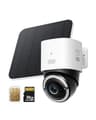
Because it replaces the Nest camera people actually own without asking them to change how the camera is installed. It is battery powered with an optional solar panel, so there is no cable to drill for; it is a pan-and-tilt camera, so one unit covers what two fixed cameras would; it shoots 4K; and it records to a microSD card inside the camera, which is the job no Nest model does. Reolink publishes dual-band Wi-Fi for it, which matters more than it sounds on a battery camera, and its local-first design extends to an NVR if you ever want several cameras writing to one box.
The honest cons. It is an event-clip camera, not a continuous one — the same limitation a Nest Cam (battery) has, and we are not going to award it something it does not do. Pan and tilt is a motorized mechanism, which is one more thing on an outdoor camera that can fail. Reolink does not publish Apple Home support, so if you were planning to leave Google for Apple rather than for your own hardware, check our compatibility matrix before you order. And a card-based camera moves one risk onto you: if someone takes the camera, they take the card. That is the trade-off for a cloud you do not pay for, and it is the reason we still rate a cloud plan as a legitimate choice rather than a scam.
Why the Wyze Cam v4 is the best swap for a wired Nest Cam
If your Nest Cam is plugged in, the feature you are most likely to miss is the one Google charges most for: continuous recording. The Wyze Cam v4 does it to a microSD card with no plan, which makes it the only pick here that beats the paid Nest tier at its own job rather than working around it. It is 2.5K, it looks far better than its price, and Wyze’s paid Cam Plus tier adds cloud events and smarter detection without ever being required for the camera to record.
The honest cons. It needs USB power, so it is not a replacement for a Nest Cam (battery) and we have not awarded it as one. Continuous recording to a card means the card is being written to constantly, so buy a card rated for it rather than the cheapest one in the drawer. Wyze publishes no Apple Home support. And the paid tier exists for a reason — the free experience is a camera and a card, not a detection service. Our full Wyze Cam review and Wyze vs Blink both go deeper on where the free tier stops.
Why the Tapo C120 is the budget pick
It is the cheapest camera we would put on a wall that still gives you the thing this page is about: a card slot, taking cards up to 512GB, with no plan prompt you have to act on. The sensor is 2K+ QHD, it is rated for indoor or outdoor use, and TP-Link’s optional Tapo Care cloud tier is genuinely optional. For anyone whose reason for leaving Nest is simply that three hours of history is not enough and they do not want a bill, this is the smallest amount of money that fixes it.
The honest cons. It is wired, so it is not a like-for-like swap for a battery Nest Cam. TP-Link lists 802.11b/g/n only, which means 2.4GHz Wi-Fi and no 5GHz — fine for a camera, worth knowing if your 2.4GHz band is already crowded. No Apple Home is published. And at this price the build is plastic and the mount is simple; it is a good camera for the money rather than a premium one. The best security cameras under $100 page ranks it against everything else under that line.
Why the eufyCam S330 kit is the pick if you are replacing several
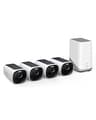
Most people with a Nest Cam problem have more than one Nest Cam, and replacing three or four cameras one at a time is how you end up with three apps. The eufyCam S330 kit is the clean version of that job: 4K cameras with integrated solar charging, and a HomeBase 3 that holds the footage locally with expandable storage, so the whole system records with no fee and no card-per-camera to manage. It is the clearest expression of the buy-once approach on this site.
The honest cons. It is by far the most expensive thing on this page up front, and the argument for it is a five-year one rather than a this-month one. It is event-based, not continuous. No Apple Home is published. And there is history to know about rather than paper over: eufy had a 2022 disclosure about how cloud thumbnails were handled, which is part of why we test the local-storage claim in every eufy entry rather than taking the marketing at face value — the detail is in our eufyCam review.
Why the eufy 4G LTE Cam S330 is the pick where there is no Wi-Fi
Google states that a Nest camera needs to be connected to both Wi-Fi and the Nest service to upload video, which rules Nest out of an entire set of places people want a camera: a gate at the end of a drive, a barn, a building site, a vehicle, a lot with no router. The eufy 4G LTE Cam S330 is the only camera we list that does not need your network at all — eufy publishes a 3-in-1 SIM working on AT&T, T-Mobile and Verizon, eight US LTE bands, a 9,400mAh battery with a solar panel, and a 32GB card in the box with a slot taking up to 128GB.
The honest cons. The cellular data plan is a real monthly cost, and it is the one fee on this page we cannot make disappear — it is simply a carrier bill rather than a camera company’s. It is overkill, and overpriced, for a camera that could just use your Wi-Fi. And it is a single camera rather than a system. Our full review covers what the data use actually looks like.
Two cameras we did not pick, and exactly why
The Arlo Pro 2K (6th Gen) has the best spec sheet of any wire-free camera we cover — 2K HDR, a 160-degree view, spotlight, siren, dual-band Wi-Fi and the broadest ecosystem list including Apple Home. It is not on this page because of what Arlo’s own plan page says: without a service plan you have live streaming and two-way audio, and video history is an Arlo Secure feature. Arlo also documents local storage on a SmartHub as a backup to the cloud rather than a replacement for it. Swapping a Nest subscription for an Arlo subscription is a lateral move, and that is not what someone searching this phrase is asking for. It is ranked properly, with that caveat attached, on our best home security cameras page.
The Blink Outdoor 4 is cheap, wire-free and Alexa-native with a long battery life, and its bundled Sync Module Core does not record clips on its own — you either take a Blink plan or add a Sync Module 2 and a USB drive, which is a second purchase at roughly the price of a camera. There is also a generation note: as of our November 20, 2026 check, Blink’s own home page features only 2K models and no longer lists the Outdoor 4. A page about keeping your own footage is the wrong page to put it on. Our Arlo vs Blink comparison covers both of these in full.
When you should stay with Nest
You use the intelligence, not just the camera. Familiar faces, AI descriptions, Home Brief, asking your house what happened this afternoon — nothing on this page competes, and nothing on this page is going to. If you are in Illinois, note Google’s own footnote that familiar face detection is not available there.
Your whole house is Google Home and you want one app. A Nest camera is the only camera that is native rather than integrated, and our best Google Home devices page is the honest read on what that is worth.
You genuinely prefer the cloud. A camera that writes to a card in the camera hands you the footage and the risk of losing it together. If a stolen camera meaning stolen evidence is the thing that would bother you most, the cloud is doing a job, and paying for it is a reasonable decision rather than a mistake. Our guide to cameras without a subscription lays out both sides.