What an August does for you — and who takes each job
Job one: go on without changing the outside of your door. This is August’s whole reason to exist. The lock mounts on the interior side over your existing deadbolt, so the exterior hardware, the keyway and the keys in everybody’s pocket all keep working, and August publishes a compatibility list of deadbolts rather than a door specification. Only one pick here comes close, and it does it differently: the Level Lock+ hides its hardware so the door looks untouched. The Yale, the Wyze and the Schlage all mean unscrewing the old deadbolt and fitting a new one. For renters, that is the whole ballgame — our renters guide covers what you can and cannot change in a tenancy.
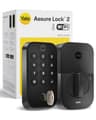
Job two: let people in without a key. Here the alternatives beat August rather than match it, and it is the most practical finding on the page. On the current August listing the keypad is the Yale Keypad Touch, a separate unit you mount next to the door within Bluetooth range of the lock. The Yale Assure Lock 2 has its keypad built into the lock itself and Yale publishes unlimited shared codes for it. The Wyze Lock Bolt has a fingerprint reader and a 4-to-8 digit keypad in the lock body. Schlage publishes up to 100 scheduled access codes on the Encode Plus. Three units on a door becomes one.
Job three: lock itself and know the door is shut. August pairs auto-unlock with DoorSense, its sensor for whether the door is actually closed rather than just locked, and charges nothing for either. Yale takes this job directly: its own product page publishes Auto-Lock with DoorSense on the Assure Lock 2. Schlage publishes auto-lock with a choice of time delays. This is a genuine tie rather than a win for anyone, and anyone telling you otherwise is reading marketing copy.
Job four: answer your phone from anywhere. August’s 4th generation builds Wi-Fi into the lock, which removed the separate Connect bridge the earlier generations needed — and August’s own compatibility page is careful about it, listing “Remote Access (Requires Wi-Fi)”, “Works with Google Assistant (Requires Wi-Fi)” and “Works with Amazon Alexa (Requires Wi-Fi)”. Our Yale pick is the Wi-Fi keypad version, which has Wi-Fi in the lock too. That qualifier matters when you buy: Yale publishes Bluetooth on every Assure Lock 2 and the Wi-Fi upgrade as what unlocks remote access, so the wrong version of the right lock is a Bluetooth-only lock. Schlage publishes built-in WiFi on the Encode Plus with no additional accessories. The Level is the exception here and we say so in its section: it is a Bluetooth lock whose remote access comes through Apple Home.
Job five: work with the voice assistant you own. August publishes Google Home, Alexa and Apple Home on the Wi-Fi Smart Lock and the Wi-Fi Smart Lock + Keypad. The Yale publishes Alexa, Google Home and Siri — and Yale’s own Google Home article is unusually specific, listing the four supported commands, noting that unlocking prompts you for a security PIN while locking and status checks do not, and stating that the lock must be on Wi-Fi via the Wi-Fi Connect Bridge. Schlage’s own works-with matrix publishes Alexa, Google Home, and Apple Home and Home Key for the Encode Plus with the note that “Home key requires a Thread-enabled home hub” — and Matter is not mentioned anywhere on that page. The Wyze publishes Alexa and Google Home and no Apple Home at all.
Job six: hand out codes to guests who pay you. If your door is a rental door, August is harder to replace than the spec sheets suggest: its Airbnb page publishes unique codes generated per reservation that are only active for the stay, with a compatible keypad required and US and Canada availability only. Schlage publishes that the Encode Plus works with the Airbnb app, so the Apple pick covers this too. Our best smart locks for an Airbnb page is the one that ranks on this job specifically.
Job seven: cost nothing monthly. Every lock on this page, August included, charges nothing. Smart locks are one of only two categories on this site where the monthly-fee question genuinely does not bite — here is the full answer, including the two places a fee can still appear.
The two jobs nothing on this page replaces
The retrofit install, and the keys that come with it. There is no way around this one. If you rent, if your front door has an unusual or expensive exterior set you want to keep, or if four people already carry a key that has to keep working, then an August is not a product category — it is the only product that does the job. The Level is the nearest answer and it is a different trade: a premium price for an invisible install, with Apple Home as the route to remote access. Everything else means a new deadbolt.
Home Assistant without extra hardware. This is the one that surprises people and it is published rather than inferred. Home Assistant’s own August integration page states that “Most devices will need either August Connect Bridge or Doorbell to connect to Home Assistant” — and then lists the August Wi-Fi Smart Lock (Gen 4) as needing neither, while the Yale Assure Lock and the Yale Assure Lock 2 are both listed as requiring one. So for a local-first smart home, the August is the better-documented lock of the two, and swapping it for the Yale is a step backward. Our best Home Assistant smart locks page ranks this properly. Note that the integration is documented as Cloud Push either way, so neither lock is a local-only device.
August against the four alternatives, row by row
Every cell below comes from the maker’s own page or from our product registry, whose specs were read from those pages on the dates recorded in each entry. “Not published” means the brand does not state it — we do not fill the gap with a guess.
The August Wi-Fi Smart Lock (4th gen) against the four alternatives we cover. | August Wi-Fi (4th gen) | Yale Assure Lock 2 | Wyze Lock Bolt | Schlage Encode Plus | Level Lock+ |
|---|
| Install | Retrofit over your deadbolt | Deadbolt replacement | Deadbolt replacement | Deadbolt replacement | Hardware hidden in the deadbolt |
|---|
| Keeps your existing keys | Yes | No — new keyway, backup key included | Check the variant for a backup key | No — 5-pin C keyway, one key included | Yes, per our registry entry |
|---|
| Keypad | Separate Keypad Touch in the box | Built into the lock | Built in, plus fingerprint | Built-in touchscreen | None — app and Home Key |
|---|
| Fingerprint | Yes, on the Keypad Touch | Not published | Yes | Not published | No |
|---|
| Wi-Fi without a bridge | Yes | Yes on the Wi-Fi version only | Yes | Yes, no accessories | No — Bluetooth, remote via Apple Home |
|---|
| Apple Home | Yes | Siri voice unlock | No | Yes, plus Home Key | Yes, plus Home Key |
|---|
| Alexa | Yes, requires Wi-Fi | Yes | Yes | Yes | Not published |
|---|
| Google Home | Yes, requires Wi-Fi | Yes | Yes | Yes | Not published |
|---|
| Future radio change | Not published | Swappable module (Matter / Z-Wave) | Not published | Thread built in; Matter not on Schlage's works-with page | Not published |
|---|
| Home Assistant without a bridge | Yes (Gen 4 listed as needing none) | No — bridge required | Not listed | Not listed | Not listed |
|---|
| Door-closed sensor | DoorSense | Auto-Lock with DoorSense | Not published | Auto-lock with time delays | Not published |
|---|
| Batteries | AA | Four AA | Rechargeable, USB-C | Four AA, up to six months typical use | CR2 |
|---|
| Subscription | None | None | None | None | None |
|---|
| Check price | | $179.90 · View on Amazon$259.9931% off Price as of November 25, 2026. #ad How we’re funded | | | $219.00 · View on Amazon$349.0037% off Price as of November 25, 2026. #ad How we’re funded |
|---|
Two rows in that table are the argument for leaving: keypad and future radio change. Two are the argument for staying: keeps your existing keys and Home Assistant without a bridge.
Why the Yale Assure Lock 2 is the best replacement
Because it is the one lock here that consolidates rather than adds. The keypad is in the lock, the Wi-Fi is in the lock on the version we rank, and Yale publishes unlimited shared codes, Auto-Lock with DoorSense, four AA batteries and ANSI/BHMA Grade 2. The quiet feature is the one that matters in three years: the radio module is swappable, so a house that moves to Matter or Z-Wave later changes a module instead of buying a lock. Yale also publishes two things people forget to check — that the lock is battery powered so you keep access in a power cut, and that “if the batteries die, you can always dig out your back-up key (included)” — and it states that the lock replaces deadbolts on standard US and Canada entryway doors with an adaptor included for small bore holes.
The honest cons. The module system is a buying trap: the Assure Lock 2 ships in several radio versions, and the one that gives you remote access is the Wi-Fi one. Wi-Fi in a lock drains batteries faster than a hub connection does. The interior assembly is bulkier than a retrofit. Yale’s own Google Home article requires the Wi-Fi Connect Bridge for that integration, which is exactly the kind of small print that makes two locks with the same name behave differently. And Home Assistant lists it as needing a bridge, which the August does not. Our full Yale review and August vs Yale settle this one properly.
Why the Wyze Lock Bolt is the budget pick
It is fingerprint entry for a fraction of everything else here, and fingerprint is the feature people actually use once the novelty of phone unlocking wears off. Wyze publishes the reader plus a 4-to-8 digit keypad code and app control, an activity log showing who locked or unlocked the door, when and by which method, and a low-battery indicator that flashes red. The detail worth knowing is the one that saves you sleeping in a car: Wyze states that if the batteries die while you are away, the USB-C port allows an instant, brief charge for you to get in.
The honest cons. The build is plastic-heavy and it does not feel like the Schlage. There is no Apple Home at all, so an iPhone household loses the Home app and Siri. The variant question is real and we flag it rather than gloss it — check whether the version you are buying includes a backup physical key. And it is a deadbolt replacement, so it does not solve the renter problem that sent many people to August in the first place. Our Wyze Lock Bolt review and the best keypad and fingerprint locks page go further.
Why the Schlage Encode Plus is the pick for an Apple household
It is the most solid lock on this page and the one with the best published security credentials: Schlage publishes ANSI/BHMA A156.40 Grade AAA, a built-in alarm, built-in WiFi with no additional accessories, up to 100 scheduled access codes, four AA batteries with up to six months of typical use, and a low-battery indicator on the touchscreen and in the app. For Apple homes the draw is Home Key — tap an iPhone or Watch to unlock — and Schlage’s own works-with page also lists it as working with the Airbnb app.
The honest cons. It is the most expensive lock we cover and the price gap to the Yale is not small. The exterior keypad is large, which is a real consideration on a narrow or decorative door. Home Key is not unconditional: Schlage publishes that it requires a Thread-enabled home hub, so an Apple household without one does not get the feature it is paying for. Matter is not mentioned anywhere on Schlage’s works-with page, and voice unlock with a PIN is listed only for the Z-Wave Schlage Connect rather than for this lock. And Wi-Fi always on costs battery. Our Schlage review and best Apple Home smart locks cover the Home Key question in full.
Why the Level Lock+ is the pick if the door must look untouched
It is the only alternative here that keeps August’s best idea. Our registry entry describes it as hiding its hardware inside the deadbolt so the door looks untouched, keeping your existing keys and exterior, with Apple Home Key tap-to-unlock. If the reason you bought an August was that you did not want a gadget bolted to your front door, this is the lock that respects that and still gives you a modern unlock method.
The honest cons. You pay a premium for design rather than for features, and the feature list is the shortest on this page. It is a Bluetooth lock: remote access runs through Apple Home, which means an Apple household with a home hub or no remote access at all. Level leans so hard into Apple that on Android our own registry entry tells you to look at the Yale or the August instead. It takes a CR2 battery rather than AAs, so the spare is a trip to a different shelf. And there is no keypad, so a visitor with no app is a visitor with no way in. Our Level Lock review and August vs Level are the two pages that settle retrofit against invisible.
When you should stay with August
You rent. An August goes on and comes off without changing anything the landlord owns, and nothing else on this page except the Level can say that.
The existing keys have to keep working. Four keys in four pockets is a real constraint, and a deadbolt replacement invalidates all of them at once.
You run Home Assistant. Home Assistant’s own table lists the Gen 4 August as the lock in this family that needs no bridge, while both Yale Assure locks require one. Swapping would cost you hardware and a step of reliability. The full ranking across every price, retrofits and replacements together, is on our best smart locks page, and if the budget is the reason you are here, the best smart locks under $200 is the shelf to start on.