Circuit & Chime

Best Smart Home Devices for Home Assistant

Six devices picked on the only question a Home Assistant household should ask: does it talk to your server on your own network, or does the integration go out to the maker's cloud and back?

By Stephen V.Last updated How we test

How this is funded: we earn a commission if you buy through our links, at no extra cost to you. It never changes which product we recommend, and we’ll tell you plainly when we’d skip one. Full disclosure.

Quick picks

Ranked on published specs, storage and running cost. Select a row to jump to the full write-up. We haven’t lab-tested these — here is exactly what we do instead.

#ProductBest forSubscriptionPrice
1
Reolink Argus PT Ultra (4K, solar)

Reolink Argus PT Ultra (4K, solar)

A 4K pan-and-tilt camera that records to an SD card and can run on solar — a lot of hardware for the money, with no subscription anywhere in the plan.

Best camera: a native, local integrationNo fee needed
$99.99 · View on Amazon

$166.9940% off

Price as of November 22, 2026. #ad How we’re funded

2
Govee Smart Light Bulb A19 Multicolor (H6008, single)

Govee Smart Light Bulb A19 Multicolor (H6008, single)

The sane way to try smart lighting on exactly one lamp. It is sold as a single bulb rather than a multipack, the listing publishes Matter alongside Alexa and Google so it is not stranded in one app, and if you decide the whole idea is not for you, you have spent the price of a takeout coffee round.

Best on the smallest budgetNo fee needed
$10.99 · View on Amazon

$14.9927% off

Price as of November 22, 2026. #ad How we’re funded

3
TP-Link Tapo P110M (4-pack)

TP-Link Tapo P110M (4-pack)

The plug that stops the ecosystem question mattering: it's Matter-certified, so it joins Apple Home, Alexa, Google Home or SmartThings without a brand bridge, and TP-Link publishes real-time and historical energy tracking on top. In a four-pack it's the quickest way to put a whole room's worth of appliances on a schedule.

Best plug: Matter, with energy figuresNo fee needed
$28.69 · View on Amazon

$35.9920% off

Price as of November 22, 2026. #ad How we’re funded

4
Aqara Doorbell Camera Hub G410

Aqara Doorbell Camera Hub G410

The only no-fee doorbell here that an Apple household can actually use, and the only one that doubles as a smart home hub — Aqara publishes a Matter controller, a Thread border router and a Zigbee hub inside the indoor chime, which is also where the memory card lives.

Best doorbell, and it brings a Thread border routerNo fee needed
$99.99 · View on Amazon

$144.9931% off

Price as of November 22, 2026. #ad How we’re funded

5
Philips Hue Essential Starter Kit (Bridge + 4 bulbs)

Philips Hue Essential Starter Kit (Bridge + 4 bulbs)

The gold standard for smart lighting: rock-solid Zigbee bulbs on the Hue Bridge, which now speaks Matter so the whole system plugs into any ecosystem. Pricey, but nothing else is this reliable.

Best lighting: the Bridge is the integrationNo fee needed
$97.99 · View on Amazon

$139.9930% off

Price as of November 22, 2026. #ad How we’re funded

6
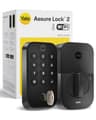
Yale Assure Lock 2 (Wi-Fi keypad)

Yale Assure Lock 2 (Wi-Fi keypad)

A full deadbolt replacement with a clean keypad and built-in Wi-Fi and — crucially — a swappable radio module, so you can move it to Matter or Z-Wave later instead of rebuying the whole lock.

Best front door, with the radio caveatNo fee needed
$179.90 · View on Amazon

$259.9931% off

Price as of November 22, 2026. #ad How we’re funded

The picks in full

#2Best on the smallest budget

Govee Smart Light Bulb A19 Multicolor (H6008, single)

The sane way to try smart lighting on exactly one lamp. It is sold as a single bulb rather than a multipack, the listing publishes Matter alongside Alexa and Google so it is not stranded in one app, and if you decide the whole idea is not for you, you have spent the price of a takeout coffee round.

Strengths

  • Sold as one bulb — no four-pack commitment to find out whether you like it
  • Publishes Matter support, so it is not locked to a single ecosystem the way a cheap brand-app bulb is
  • 800 lm and a published 2700-6500K white range, a normal 60W-equivalent lamp bulb

Trade-offs

  • Per bulb it costs more than a multipack, so it is the wrong way to do a whole room
  • 2.4GHz Wi-Fi only — Govee states on the listing that it does not support 5GHz
  • Like every Matter bulb here, it needs a Matter controller already in the house before Apple Home or Google Home can add it
Key specMatter color bulb, 800 lm, single
SubscriptionNo — works without a plan
Local storageNot applicable
ConnectivityWi-Fi 2.4GHz and Bluetooth; Matter
PowerStandard E26 socket
Works withAlexa, Google Home, Apple Home, SmartThings, Matter

Worth knowing. The listing states A19/E26, 800 lm, 9W, RGBWW with 16 million colors and 54 scene modes, a 2700-6500K white range, CRI 80, Wi-Fi plus Bluetooth, and "Works with Matter" alongside Alexa and Google Assistant, sold as a 1-pack (model H6008). Amazon's product-details table lists Apple HomeKit, Siri and SmartThings among its controllers. Govee's own notes on the listing add that it does not support 5GHz Wi-Fi and that it should not be used with smart switches.

Specs read from the product listing, on October 16, 2026. “Not published” means the brand does not state that figure.

#3Best plug: Matter, with energy figures

TP-Link Tapo P110M (4-pack)

The plug that stops the ecosystem question mattering: it's Matter-certified, so it joins Apple Home, Alexa, Google Home or SmartThings without a brand bridge, and TP-Link publishes real-time and historical energy tracking on top. In a four-pack it's the quickest way to put a whole room's worth of appliances on a schedule.

Strengths

  • Matter-certified — one plug that works in all four major ecosystems
  • Real-time and historical energy tracking published per plug
  • 66 x 38 x 40mm body designed not to cover the second socket

Trade-offs

  • 2.4GHz Wi-Fi only — it won't join a 5GHz network
  • A Tapo account is needed for setup and for the energy history
  • 15A / 1800W per plug — check the rating of anything that heats or has a motor first
Key specMatter plug, energy monitoring, 4-pack
SubscriptionNo — works without a plan
Local storageNot applicable
ConnectivityWi-Fi 2.4GHz; Matter
PowerWall outlet
Works withAlexa, Google Home, Apple Home, SmartThings, Matter

Worth knowing. TP-Link publishes a 15A / 1800W resistive maximum (1/6 HP motor) and a flame-retardant UL94-V0 housing. The energy figures are presented in the Tapo app.

Specs read from the product listing, on August 25, 2026. “Not published” means the brand does not state that figure.

#4Best doorbell, and it brings a Thread border router

Aqara Doorbell Camera Hub G410

The only no-fee doorbell here that an Apple household can actually use, and the only one that doubles as a smart home hub — Aqara publishes a Matter controller, a Thread border router and a Zigbee hub inside the indoor chime, which is also where the memory card lives.

Strengths

  • Full HomeKit Secure Video support, plus Alexa, Google Home, SmartThings and Home Assistant
  • The microSD slot is in the indoor chime, not in the doorbell a thief can unscrew
  • Doubles as a Matter controller, Thread border router and Zigbee hub

Trade-offs

  • 24/7 continuous recording only in wired mode
  • Aqara publishes a 1200p maximum resolution when you record through HomeKit Secure Video, below the camera's own 2K
  • No IP rating published for this model
Key spec2K, 175° view, Matter/Thread/Zigbee hub in the chime
SubscriptionNo — works without a plan
Local storagemicroSD up to 512GB — slot is inside the indoor chime
ConnectivityWi-Fi 2.4/5GHz; Thread border router; Zigbee hub; Matter controller
PowerReplaceable batteries (up to 5 months) or wired 12-24V AC/DC
Works withApple Home, Alexa, Google Home, SmartThings, Home Assistant

Worth knowing. Aqara publishes a built-in mmWave radar presence sensor alongside the 175° 4:3 lens, and a 95dB speaker in the chime-hub. Continuous recording needs the 12-24V wired supply; on the replaceable batteries it is event-based.

Specs read from the product listing, on October 6, 2026. “Not published” means the brand does not state that figure.

#5Best lighting: the Bridge is the integration

Philips Hue Essential Starter Kit (Bridge + 4 bulbs)

The gold standard for smart lighting: rock-solid Zigbee bulbs on the Hue Bridge, which now speaks Matter so the whole system plugs into any ecosystem. Pricey, but nothing else is this reliable.

Strengths

  • The most reliable smart bulbs, full stop
  • The Bridge adds Matter and works with every ecosystem
  • A huge range of bulbs and fixtures to expand into

Trade-offs

  • Expensive versus Wi-Fi bulbs
  • The Bridge is another box to power
  • Full color costs more than white-only
Key specBridge + 4 color bulbs (Zigbee)
SubscriptionNo — works without a plan
Local storageNot applicable
ConnectivityZigbee (via Hue Bridge); Matter
PowerStandard bulb sockets
Works withAlexa, Google Home, Apple Home, SmartThings, Matter

Worth knowing. The Bridge (Zigbee) keeps your Wi-Fi uncluttered and is why Hue stays responsive at scale — see the compatibility matrix.

Specs read from the product listing, on July 20, 2026. “Not published” means the brand does not state that figure.

#6Best front door, with the radio caveat

Yale Assure Lock 2 (Wi-Fi keypad)

A full deadbolt replacement with a clean keypad and built-in Wi-Fi and — crucially — a swappable radio module, so you can move it to Matter or Z-Wave later instead of rebuying the whole lock.

Strengths

  • Built-in Wi-Fi, no separate bridge on this model
  • Swappable module future-proofs it (Matter/Z-Wave)
  • Keyed and key-free versions available

Trade-offs

  • Wi-Fi drains batteries faster than a hub connection
  • The module system means you must buy the right version
  • Bulkier interior than a retrofit lock
Key specWi-Fi deadbolt, keypad, swappable module
SubscriptionNo — works without a plan
Local storageNot applicable (lock)
ConnectivityWi-Fi (this model); modules for Z-Wave / Matter available
PowerAA batteries
Works withAlexa, Google Home

Worth knowing. The Assure Lock 2 ships in several radio versions — match the module to your ecosystem before buying.

Specs read from the product listing, on July 20, 2026. “Not published” means the brand does not state that figure.

Frequently asked questions

What is the best smart home device for Home Assistant?

The Reolink Argus PT Ultra, among the devices we cover. Reolink's local-first design means the camera records 4K to a microSD card you own and streams on your own network rather than depending on a vendor cloud, and the pan-and-tilt head lets one camera cover a whole driveway. For a self-hosted setup, a camera whose footage already lives on your own hardware is the right first purchase. Its limits are a functional-rather-than-polished app, narrower ecosystem support (Alexa and Google Home, no Apple Home), and no published IP rating.

Does Home Assistant need extra hardware for Zigbee or Z-Wave?

Yes. Home Assistant speaks Zigbee and Z-Wave through a radio you add, not through the server itself — the Home Assistant Green publishes Ethernet connectivity with add-on radios for Z-Wave, Zigbee or Thread. Matter and Wi-Fi devices need nothing extra. That is why half the picks on this page take the Matter route: it is the one that works on a plain Home Assistant install with no USB stick in the back.

Is a local integration really better than a cloud one?

For reliability and longevity, yes, and that is the axis this page ranks on. A cloud integration depends on the vendor keeping an API available, unmetered and free — and when that changes, your automations stop and nothing on your own network can fix it. A local integration keeps working through an internet outage and through a change of corporate mind. Cloud integrations are not useless; they are rented, and on a self-hosted platform that is the wrong trade to make by default.

What is the cheapest device worth adding to Home Assistant?

The Govee Smart Light Bulb A19 Multicolor, at around ten dollars at the last refresh. It joins through Matter rather than a vendor API, and it also publishes Alexa, Google Home, Apple Home and SmartThings support. Treat it as a lamp bulb: Govee publishes 800 lumens, which is the lowest output we list. Its main value to a Home Assistant user is as a cheap test of the Matter commissioning path before buying a four-pack of anything.

Which smart lock works best with Home Assistant?

The Yale Assure Lock 2, with one important caveat about which version you buy. The model we carry is the Wi-Fi keypad lock, and Yale publishes modules for Z-Wave or Matter as separately available — the Z-Wave module is what turns it into a device your own hub controls with no cloud in the path. As sold, the Wi-Fi version is a cloud-integration lock. So the honest recommendation is the lock plus the module, priced together, rather than the lock alone.

Why is Philips Hue recommended for Home Assistant when the Bridge is usually the complaint?

Because in this specific context the Bridge is the feature. Hue bulbs are Zigbee, so they are not on your Wi-Fi at all, and the Bridge sits on your LAN where Home Assistant talks to it locally — two hops, both inside your house. Hue's own comparison publishes up to 50 lights plus 12 accessories with the Bridge against up to 10 lights per control source over Bluetooth, and whole-home coverage against 10 meters of range. The costs are the price and the extra box; if those are dealbreakers, our Philips Hue alternatives page is built around exactly that trade.

Sources

  • Integrations index — Home Assistant — Checked on 2026-10-13 for a first-party Wyze integration: no Wyze entry appears on the integrations index, and https://www.home-assistant.io/integrations/wyze/ returns HTTP 404. This is evidence of absence from the project's own documentation, not a claim that no community add-on exists (accessed October 13, 2026)
  • Reolink integration — Home Assistant — Home Assistant documents the Reolink integration's IoT class as Local Push, with camera streams at Fluent/Balanced/Clear, binary sensors for motion and AI person, vehicle and pet detection, doorbell-press sensors, PTZ buttons, siren, floodlight, battery and storage sensors and a media browser for recorded playback; it requires a camera user account with admin privileges and the HTTP/HTTPS port enabled, works with the internet blocked, and lists two-way audio/text-to-speech as not available and LTE-based Reolink models as incompatible (accessed October 6, 2026)
  • ONVIF integration — Home Assistant — Home Assistant documents the ONVIF integration as Local Push for any ONVIF Profile S conformant device, requiring the ffmpeg integration, adding entities for compatible profiles whose video encoding is set to H.264, exposing motion/field/cell/human-shape, sound, tamper and image-quality events through ONVIF's pullpoint subscription API plus infrared-lamp, autofocus and wiper switches and a PTZ action, and warning that many newer cameras default to H.265 (HEVC) while the integration looks for H.264, so the camera must be configured to output at least one H.264 stream (accessed October 6, 2026)
  • Matter integration — Home Assistant — Home Assistant documents the Matter integration's IoT class as Local Push and states that "Matter products run locally and always allow local control, with device control done without the need for any internet connection or cloud services", while noting that "some vendors may require you to set up an account before you can enable Matter support for some products". Home Assistant acts as a Matter controller and runs its own Matter Server app; Matter devices communicate over IPv6 on the existing LAN (Wi-Fi or Ethernet) or over Thread (accessed October 13, 2026)
  • TP-Link Smart Home integration — Home Assistant — Home Assistant documents ONE integration covering both TP-Link brands — "your TP-Link Kasa Smart Home Devices and TP-Link Tapo Devices such as cameras, doorbells, chimes, lights, plugs, wall switches, robot vacuums, hubs, and hub-attached devices" — with an IoT class of Local Polling. It states that it "connects locally to the devices without going via the TP-Link cloud. This is different from the native Tapo and Kasa apps which will connect to the devices via the TP-Link cloud if the device has access to the internet", and that devices are polled every 5 seconds with Home Assistant-initiated changes reflected immediately. Supported Kasa plugs include EP10, EP25, HS100, HS103, HS105, HS110, KP100, KP105, KP115, KP125, KP125M and KP401; EP40 and EP40M are listed under Power Strips. Supported Tapo plugs are P100, P105, P110, P110M, P115, P125M, P135 and TP15. Newer Kasa and all Tapo devices "require your TP-Link cloud username and password to authenticate for local access". Energy-monitoring devices create sensors that can feed the Home Assistant energy dashboard; Kasa power-strip child plugs update their energy state only every 60 seconds. Some firmware requires Third-Party Compatibility to be switched on in the vendor app first, and devices on a different subnet to Home Assistant are not auto-discovered (accessed October 13, 2026)
  • TP-Link Smart Home integration — supported bulbs — Home Assistant — The supported-device lists on Home Assistant's TP-Link integration page, read on this date for bulbs specifically. Supported Kasa bulbs: "KL110, KL120, KL125, KL130, KL135, KL50, KL60, LB110", with Kasa light strips listed separately as KL400L5, KL420L5 and KL430. Supported Tapo bulbs: "L510B, L510E, L530E, L630", with Tapo light strips L900-5, L900-10, L920-5 and L930-5 — the Tapo L535E does NOT appear on the list, and the page notes that "Tapo devices require authentication". The integration's IoT class remains Local Polling (accessed October 17, 2026)
  • Govee lights local integration — Home Assistant — Home Assistant documents a second, separate Govee integration — "Govee lights local" — with an IoT class of Local Push, which "integrates Govee lights into Home Assistant using Local API control" and requires local control to be enabled on the device first via Govee's own instructions. Its published list of supported devices includes model H6008, the Govee A19 multicolor bulb, alongside H6004, H6006, H600A and a long list of other Govee lights and strips (accessed October 17, 2026)
  • Aqara — Home Assistant — Home Assistant lists Aqara with an IoT class of Local Push and states that "Aqara is a member of the Works with Home Assistant partner program for their Matter products", that "Aqara Matter devices work locally and integrate seamlessly with the Matter integration in Home Assistant" and that "as all connectivity is happening locally, status updates and controlling your devices happen instantly in Home Assistant". The brand was introduced in Home Assistant 2024.10 and the integration is community maintained, with categories listed as Lock, Sensor, Binary sensor and Light. The certified device list read on this date names the Aqara Hub M3, Valve Controller T1, LED Bulb T2, Smart Lock U200/U300/U400, Motion and Light Sensor P2, Door and Window Sensor P2, Presence Sensor FP1E, Climate Sensor, Light Switch H2 and Presence Sensor FP300 — no Aqara camera or doorbell appears on it (accessed October 17, 2026)
  • Philips Hue integration — Home Assistant — Home Assistant documents the Philips Hue integration with an IoT class of Local Push. It controls and monitors "the lights and sensors connected to your Hue bridge", supports lights, motion sensors (including temperature and light-level sensors) and remotes/switches as device triggers plus battery sensors, is auto-discovered on the network, and automatically creates (but disables by default) grouped light entities for each Hue room and zone. Hue scenes created in the Hue app are imported automatically as scene entities, while creating or editing Hue scenes from Home Assistant is explicitly not supported; Home Assistant recommends using a Hue scene when controlling several lights at once because "a Hue scene sends commands to all lights at once in an optimized way" whereas controlling lights individually sends each command one by one. The page also documents separate handling for legacy V1 (round) and V2 (square) bridges, with a Scene select entity per room and zone on V2 bridges (accessed October 17, 2026)
  • How to connect Philips Hue without a Bridge? — Philips Hue — Philips Hue's own comparison of Bluetooth control with Bridge control, RE-READ in full on 2026-11-18 for the Hue alternatives page. The published table reads, verbatim: light count "Up to 10 lights per control source" without a Bridge versus "Up to 50 lights + 12 accessories" with one; range "10 meters (Bluetooth range)" versus "Whole-home coverage (WiFi + Zigbee mesh)"; remote access "Local only" versus "Global control via WiFi"; automations "Basic timers & routines" versus "Full automations, custom scenes, schedules"; integrations "Limited (Bluetooth, Alexa, Google)" versus "Full smart home compatibility (Matter, Apple HomeKit, SmartThings)". Hue ties automations, custom scenes, schedules and "multi-room syncing" to the Bridge. The page CONTRADICTS ITSELF on Matter: the table lists Matter under Bridge integrations, while the body says Matter-enabled bulbs can connect directly to a controller such as a Nest Hub, Echo or HomePod mini and the closing section lists "Matter connectivity" as a Bridge-free option. NOT published, checked on this date: whether Hue sensors work without a Bridge, whether entertainment or sync features do, whether Bluetooth supports scenes at all, what "basic timers & routines" includes, how the 10-meter range is measured, and which specific bulbs carry Bluetooth beyond a packaging logo (accessed November 18, 2026)
  • Yale integration — Home Assistant — Home Assistant documents the Yale integration's IoT class as Cloud Push, authenticating with the same credentials used in the Yale Home app, with lock, sensor, camera, doorbell, binary-sensor, button and event platforms. Its known-working table lists the Yale Assure Lock, Conexis L1, Conexis L2, Doorman L3, Linus and Smart Safe as requiring a Connect Bridge or Doorbell, and the Linus L2 as requiring neither. The integration can also keep the offline access keys used by the local Yale Access Bluetooth integration up to date (accessed October 11, 2026)
  • Home Assistant Green — Home Assistant (official) — Nabu Casa's product page: a published recommended MSRP sold through authorized distributors, with no promotion listed (accessed September 13, 2026)

Keep reading